
Why Is My Google Ad Disapproved? (And How to Fix It)
By Adrian Chromenko, primarydm.com·November 23, 2026·7 min read
Quick answer
A disapproved ad broke a Google Ads policy and can't show anywhere. Open Campaigns › Ads and hover over Disapproved in the Status column to see which policy. The usual causes for small businesses are a broken landing page (Destination not working), a URL that doesn't match your site, all caps, or extra punctuation like "!!". Edit the ad, fix it and save, and it's reviewed again, usually within one business day. If Google got it wrong, appeal from Tools › Policy manager.
Your Google ad says Disapproved, and you're not sure why. A disapproved ad can't show anywhere, so until it's fixed you're paying for nothing from it. The good news: Google always tells you which policy the ad broke, and for small businesses it's usually one of a handful of simple problems, like a broken landing page or an ad written in all caps. This guide shows you where to find the reason, how to fix the most common ones, and when to appeal. Watch the video above, or follow the steps below.
What "Disapproved" means
Every ad is reviewed after you create or edit it, including its headlines, descriptions, keywords and landing page. If it passes, its status changes to Eligible and it starts running. If it breaks a Google Ads policy, its status changes to Disapproved, which means it can't show anywhere and gets zero impressions.
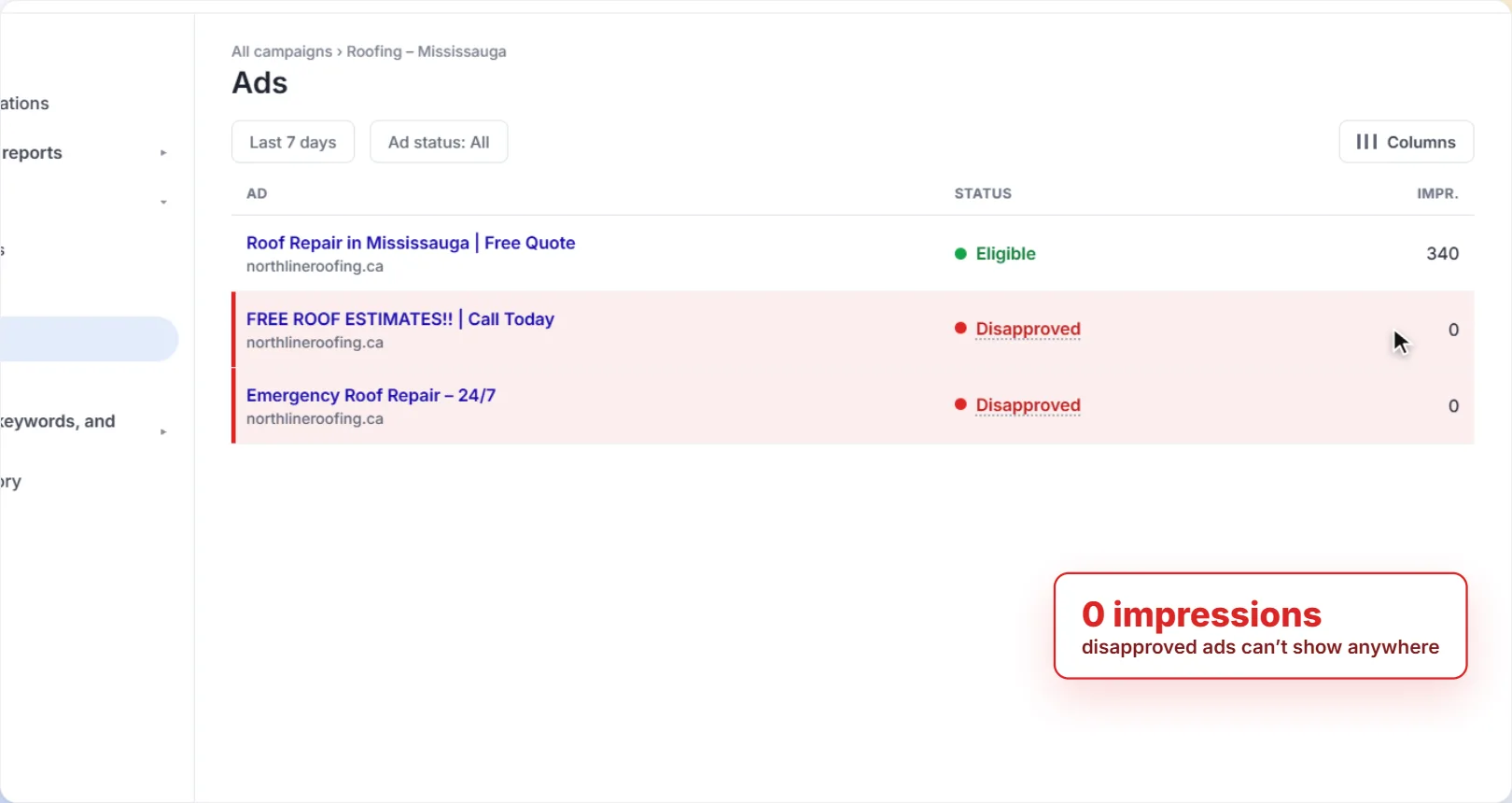
A disapproval affects that ad, not your whole account. Your other ads keep running. But if your campaign only has one ad, or the disapproval is on your landing page, the whole campaign can stop showing. If your ads aren't disapproved but still aren't appearing, see why your Google Ads aren't showing instead.
How to find out why your ad was disapproved
1Hover over the Disapproved status
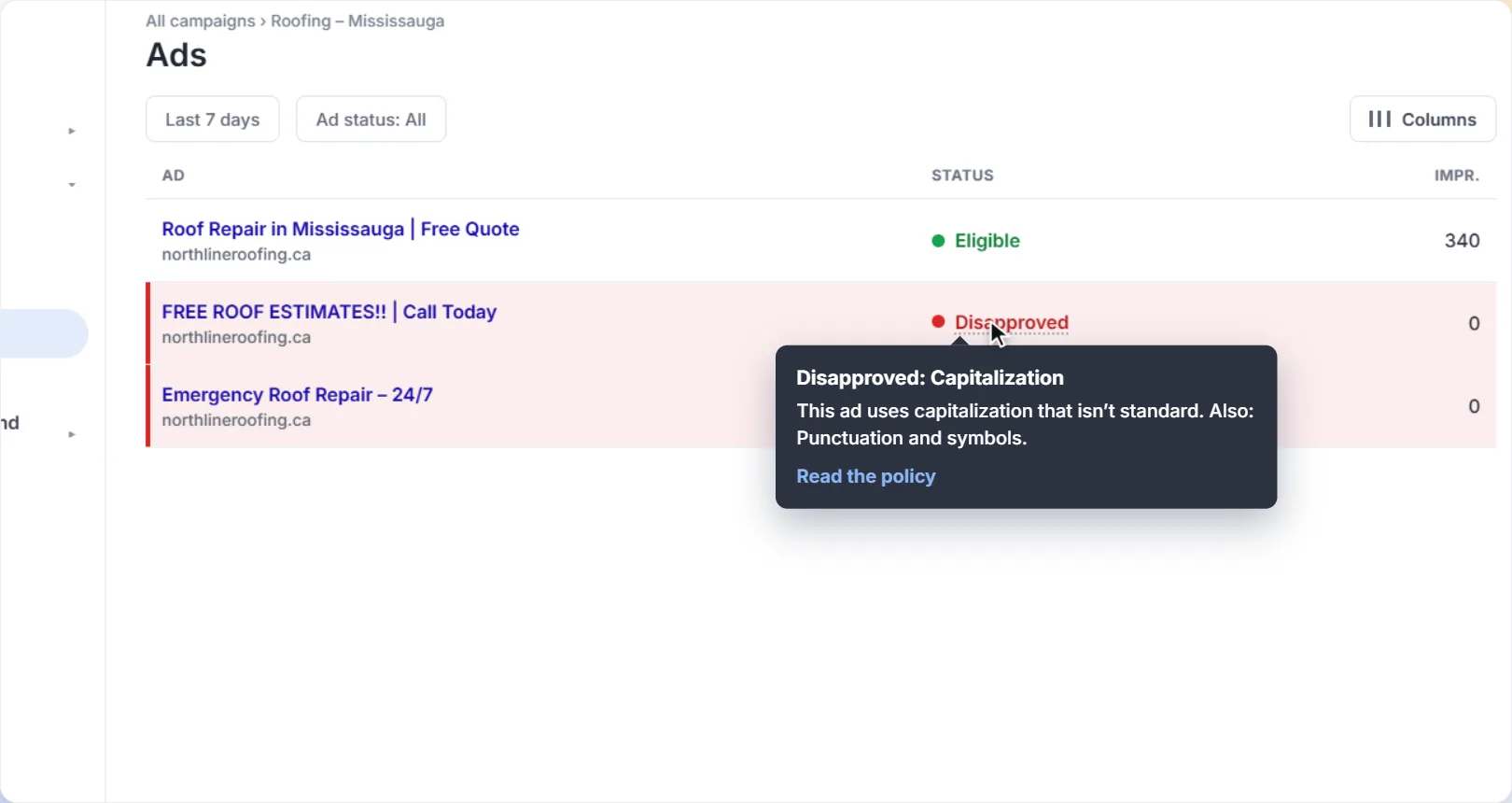
Open Campaigns, then Ads. In the Status column, hover over Disapproved. A box shows which policy the ad broke, with a Read the policy link that explains the rule.
2Add the Policy details column to see every reason
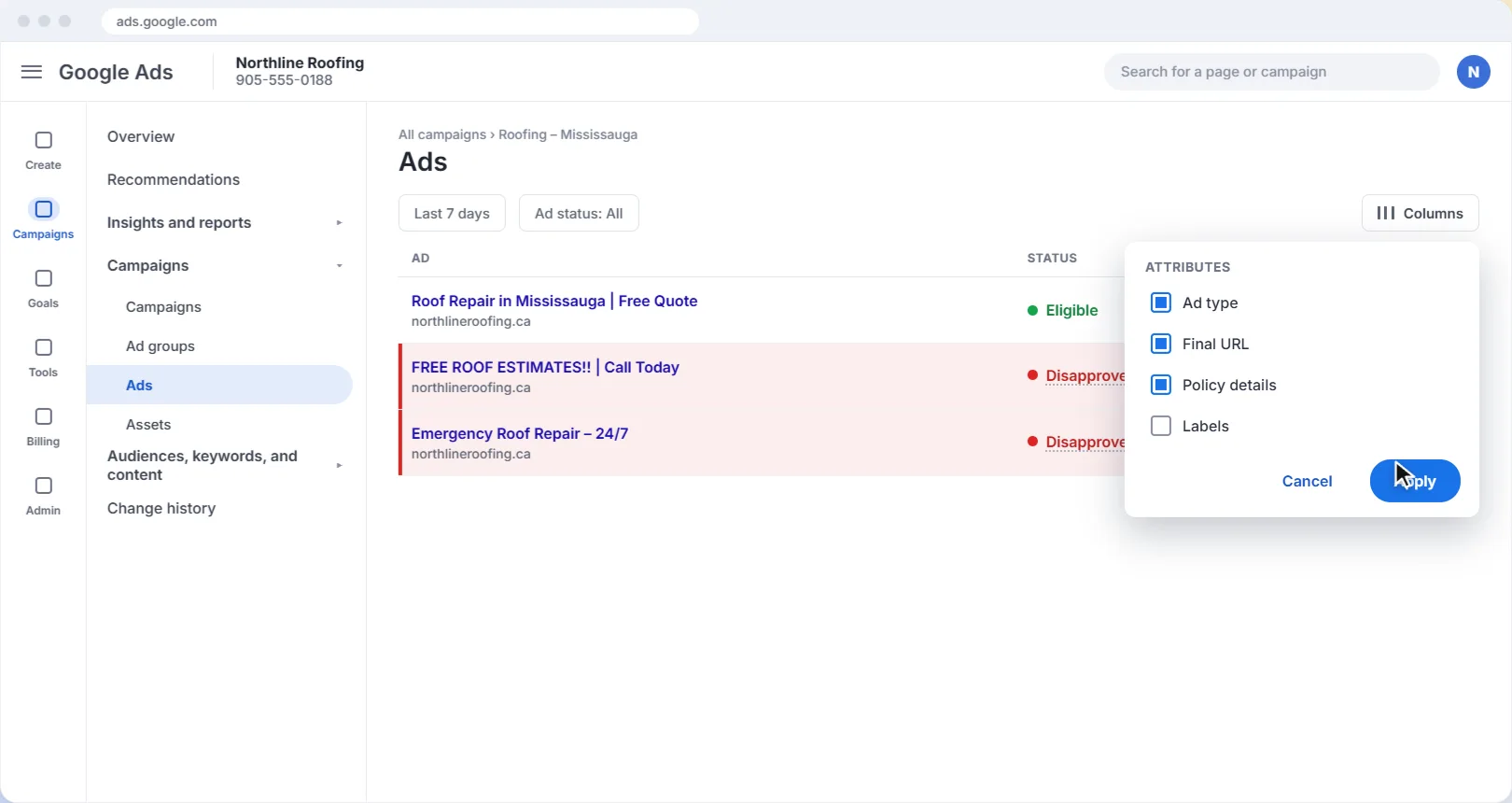
If you have more than one disapproved ad, add a column so you can see every reason at once. Above the table, click Columns, open Attributes, tick Policy details and click Apply.
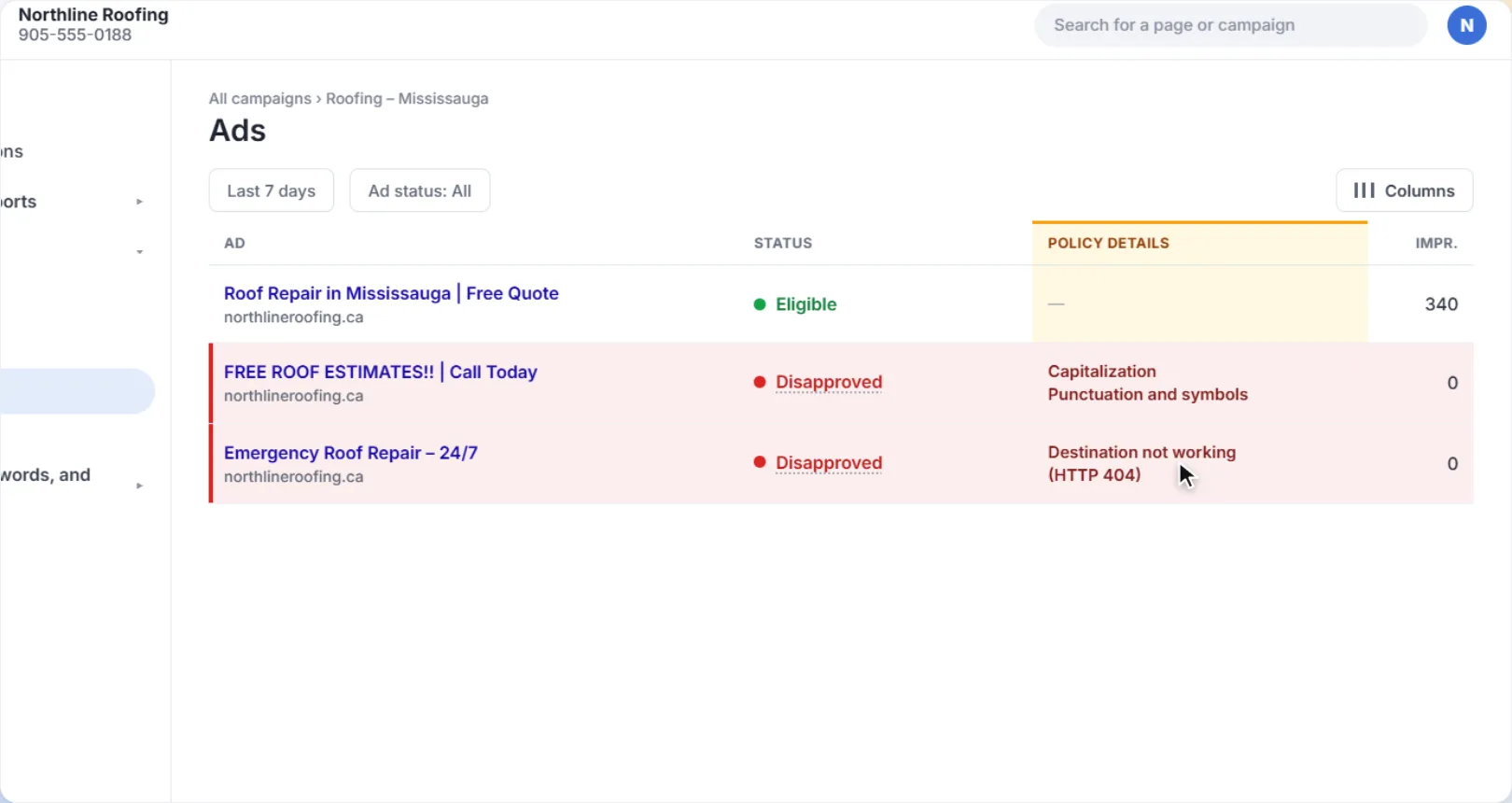
The Policy details column now lists the policy affecting each ad. One ad can break more than one policy, like Capitalization and Punctuation and symbols together.
Got an email from Google? Disapproval emails include a View and fix policy issues link. It opens Policy manager with the affected ads already listed, so you can hover over each status the same way.
The most common reasons, and how to fix each
These are the disapprovals we see most often on small business accounts. The name in the first column is what Google shows in the status or Policy details column.
| Policy | What it usually means | Fix |
|---|---|---|
| Destination not working | Google couldn't load your landing page. Common causes: a typo in the final URL, a deleted page (404), a server error (500), an expired domain, or a "site under construction" page. | Open the final URL yourself on a phone and a computer. Fix the link or the page, then save the ad. |
| Destination mismatch | The website shown in your ad doesn't match the site people land on, or your final URL redirects to a different domain. | Make the display URL and final URL use the same domain, and remove redirects to other domains. |
| Capitalization | Words in all caps or odd capitals, like "FREE ESTIMATES" or "FrEe". Common abbreviations like "ASAP" are usually fine. | Rewrite in normal sentence or title case. |
| Punctuation and symbols | Repeated punctuation like "Call now!!", symbols used as letters like "r00fing", decorative symbols, or emoji. | Remove the extra punctuation, symbols and emoji. |
| Compromised site | Your website has been hacked, and Google has found code on it that harms visitors or sends them elsewhere. | Clean the site and close the hole first, then ask for a review. Your web developer or host can help. |
| Trademarks | Your ad text uses a brand name the owner has restricted, such as a supplier's name. | Remove the brand name, or appeal if you're authorized to use it. |
You may also see Unsupported language, which usually means the ad text is in a language Google can't match to your targeting, or Destination not crawlable, which means something on your site is blocking Google's checker. Hover over the status and follow Read the policy for the exact rule.
A slow or broken site costs you twice. Destination not working stops your ads completely, and a slow page loses the people who do click. If your site is sluggish, start with why a website is slow and how to fix it. If you suspect it's been hacked, a website maintenance plan keeps it updated, backed up and monitored.
How to fix a disapproved ad
3Edit the ad text and save
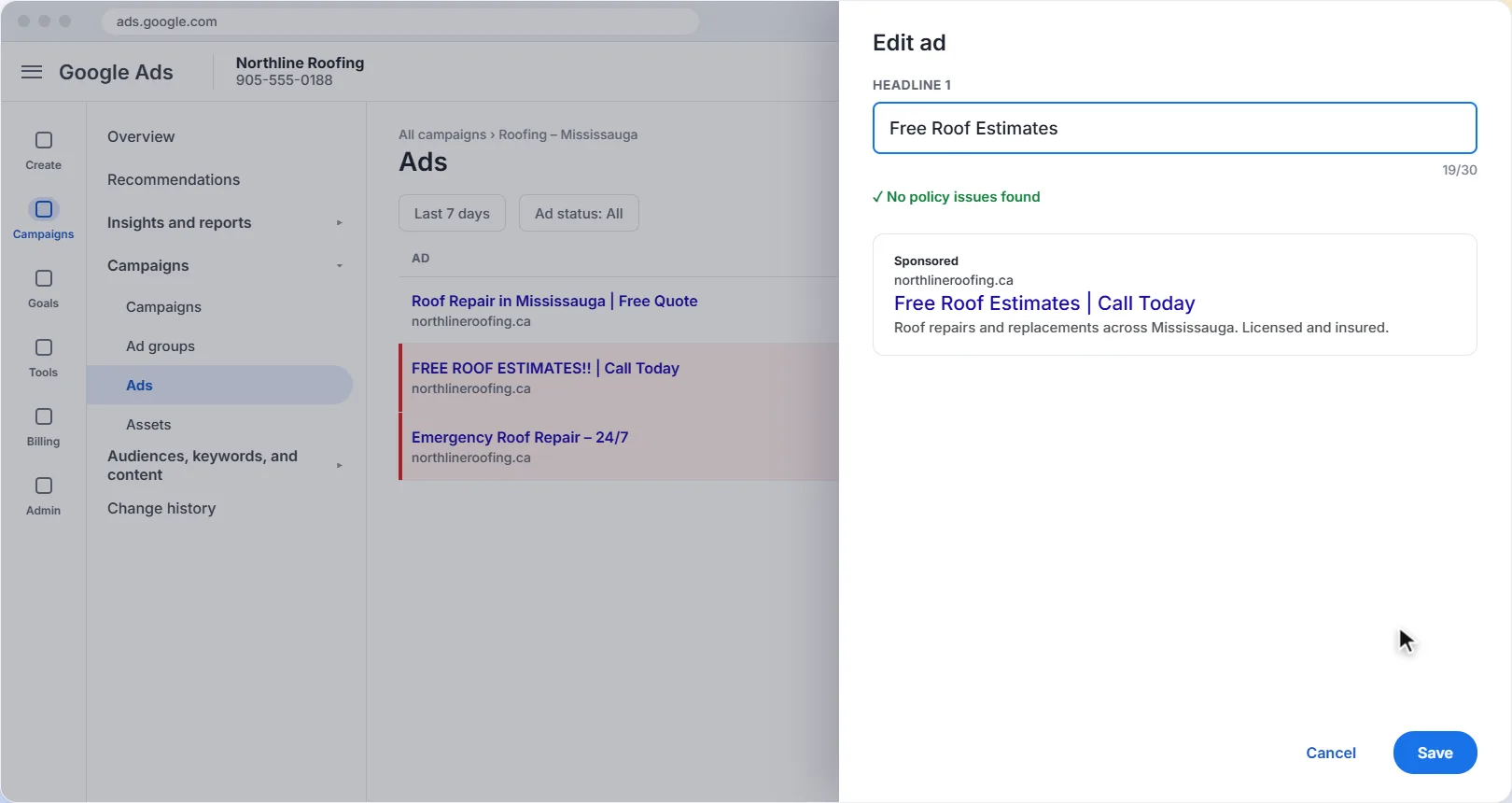
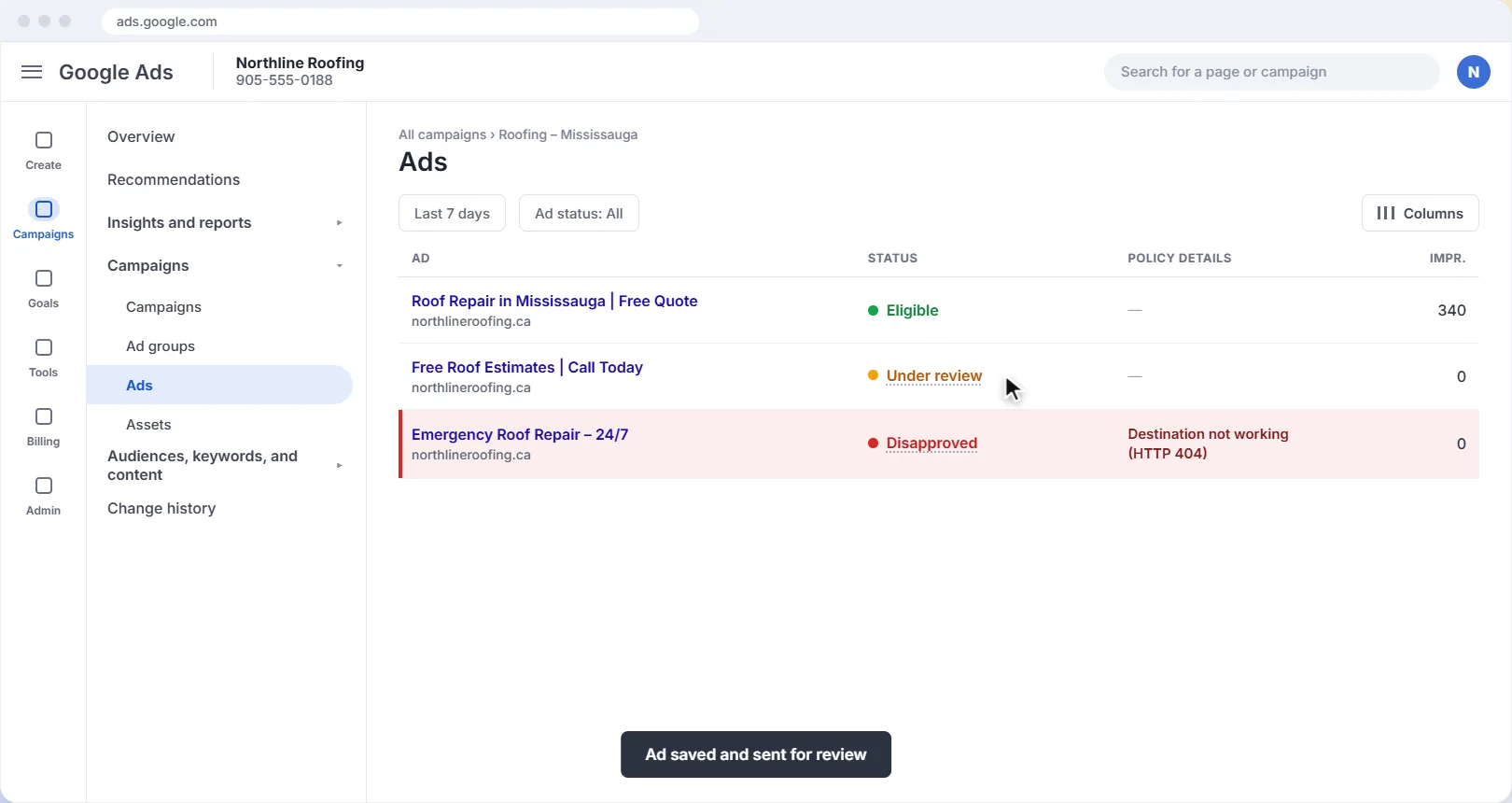
For problems in the ad itself, like capitalization or punctuation, hover over the ad in the Ads table and click the pencil (Edit) icon. Correct the text, check the preview, and click Save. Saving sends the ad back for review automatically: its status changes to Under review.
4Fix the landing page or final URL
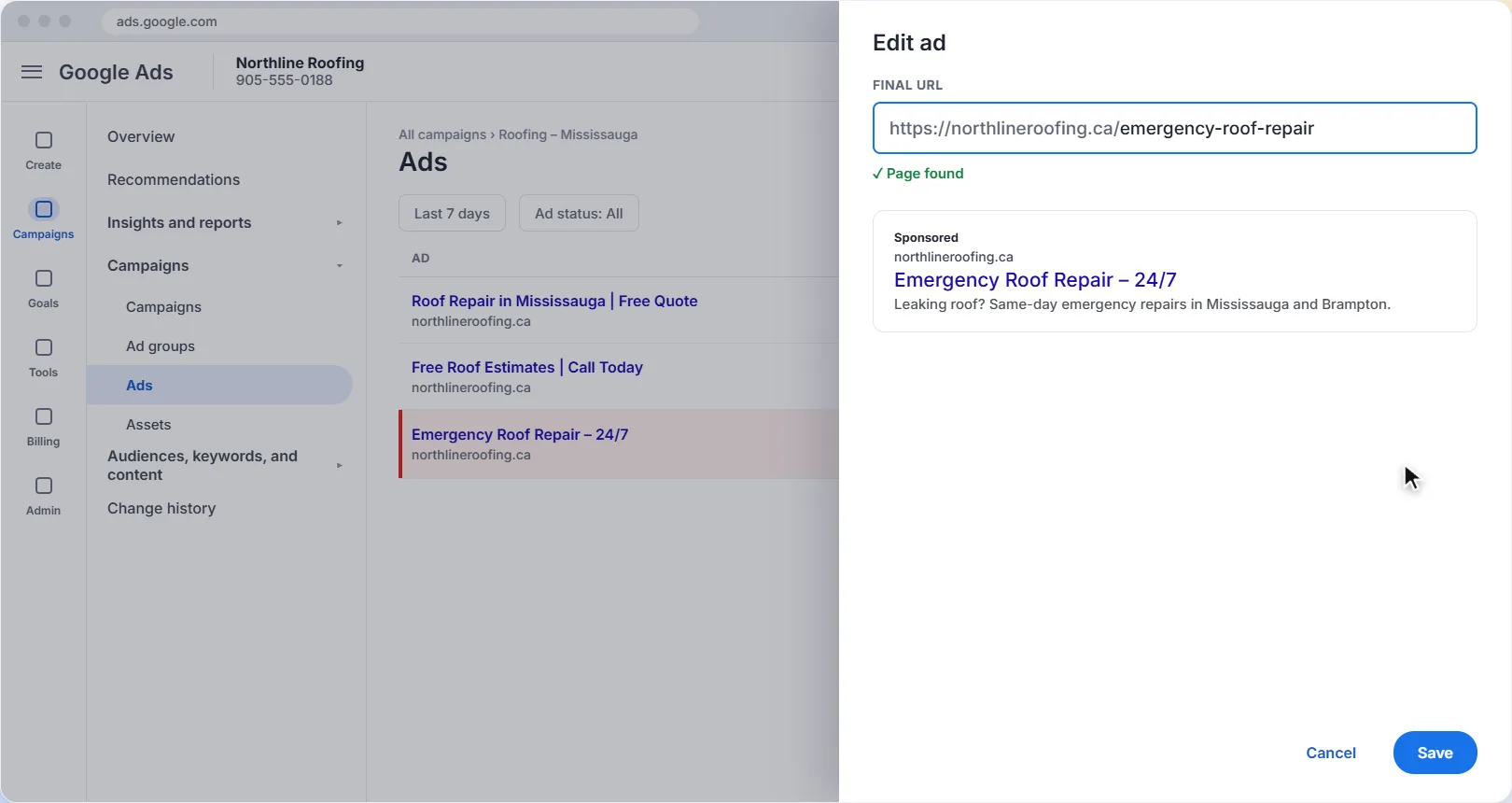
For Destination not working, check the final URL for typos first. In this example, "emergancy" was misspelled, so the link went to a page that doesn't exist. Edit the ad, correct the Final URL and save. If the URL is right but the page itself is broken, fix the page with your web developer, then make a small edit to the ad and save it so Google checks the page again.
Writing new ads? Most text disapprovals are avoidable: normal capitalization, one exclamation mark at most, no phone number in the ad text (use a call asset instead) and no emoji. See how to write Google Ads for more.
How to appeal a disapproval
5Appeal from Policy manager
If you've fixed the ad and it's still disapproved, or you think Google got it wrong, you can appeal. Click Tools, then under Troubleshooting open Policy manager. On the Policy issues tab, click Appeal next to the ad. Under Reason for appealing, choose Dispute decision or Made changes to comply with policy, then click Submit.
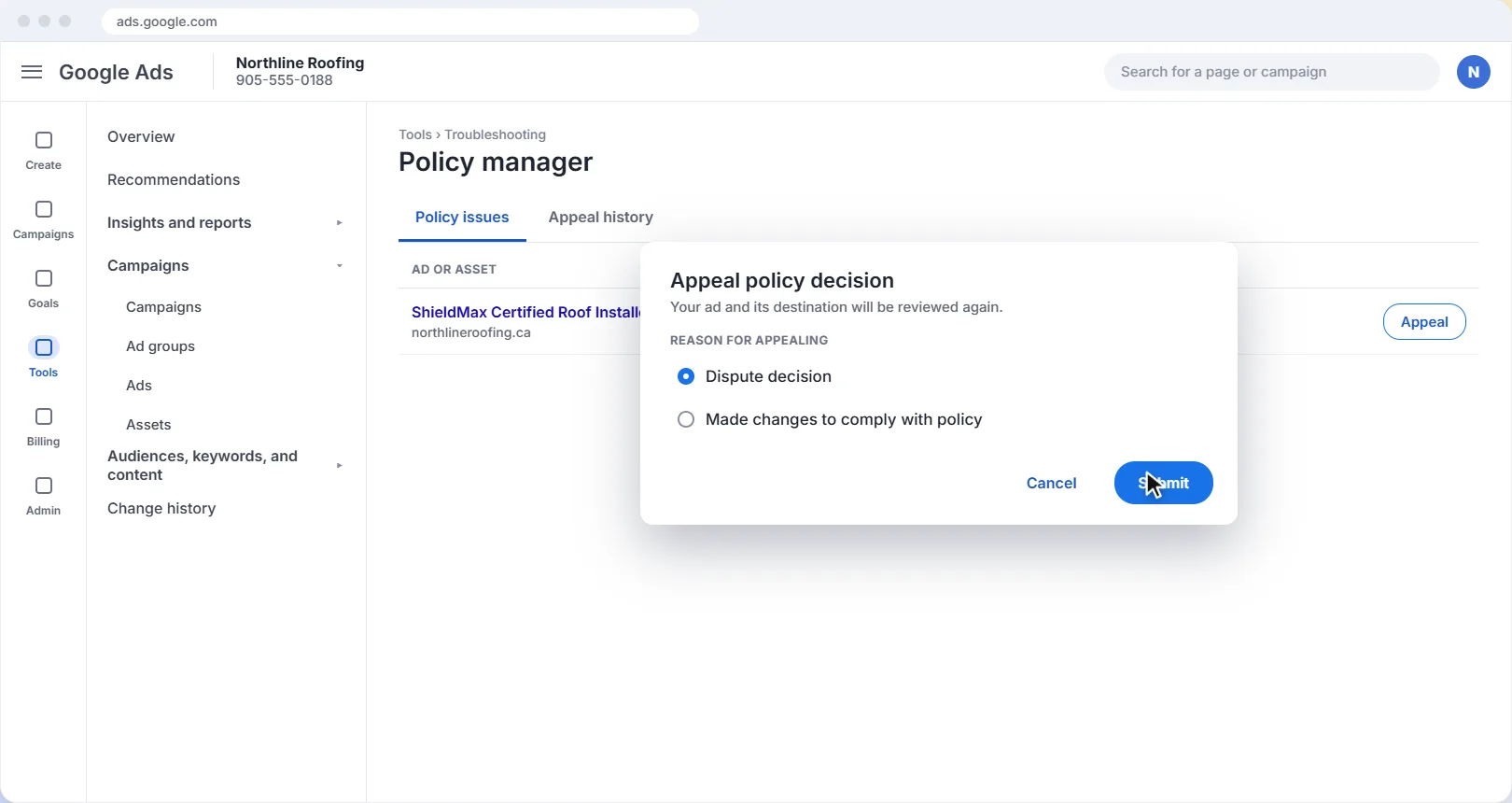
You can also appeal from the Ads page: tick the disapproved ads, click Edit, then Appeal policy decision. Track the result on the Appeal history tab in Policy manager.
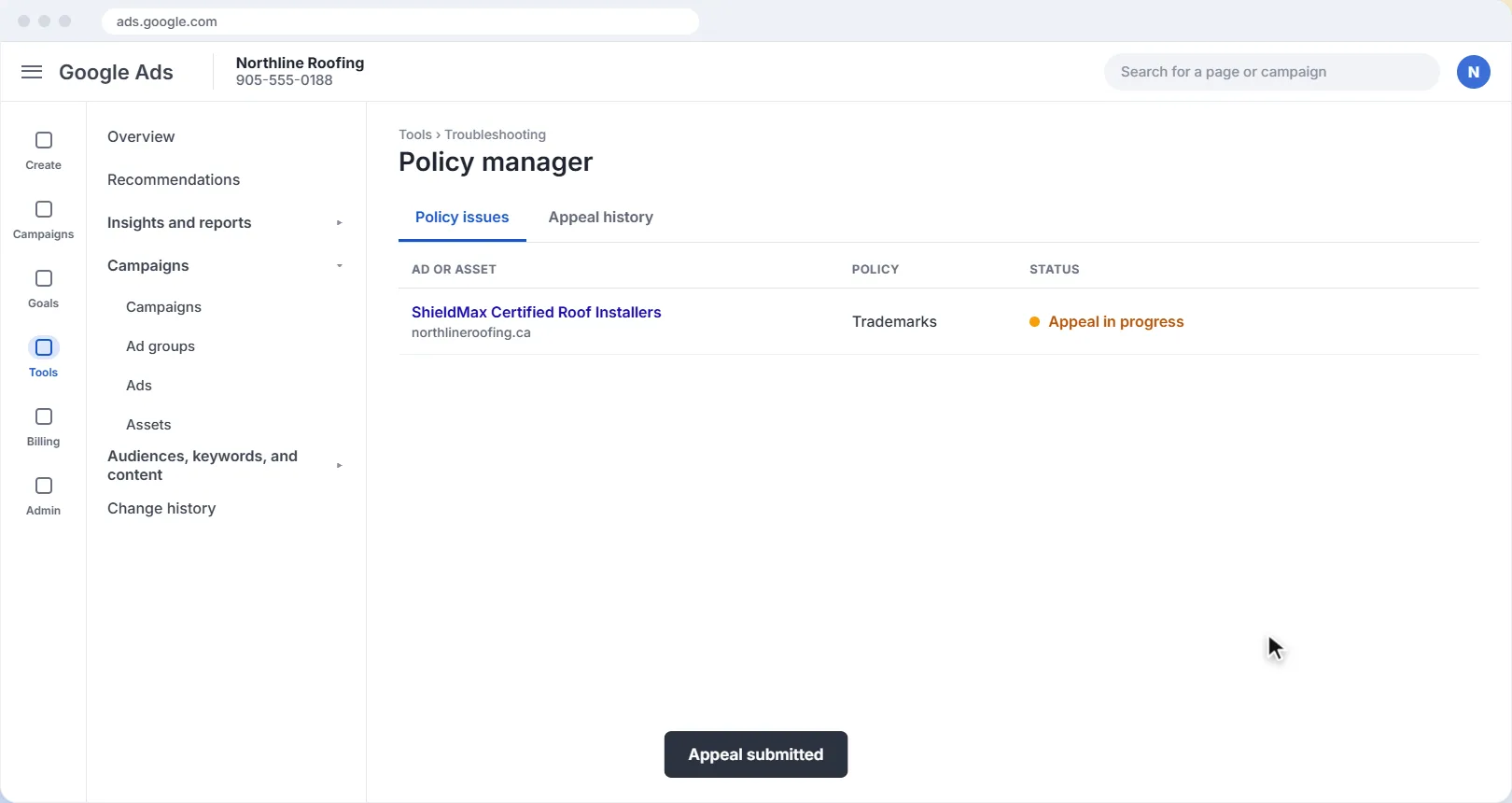
Don't keep resubmitting. Each ad can be appealed 3 times. After 3 unsuccessful appeals you have to contact Google Ads support. Wait at least 24 hours between appeals for the same ad, or they're marked as duplicates. If an appeal fails after you've fixed the problem, make a small edit to the ad text or final URL and save it, which makes Google check it again.
How long does Google take to review an ad?
Most ads are reviewed within one business day; more complex reviews can take longer. Editing an ad restarts its review, so avoid making lots of small changes while it's under review. Appeals show In progress in Policy manager; check back after 24 hours. If a review takes longer than a couple of business days, contact Google Ads support.
Once your ad is running again, make the clicks count: check the search terms report, add negative keywords, and make sure you're tracking calls and forms.
Rather not deal with disapprovals?
We set up and manage Google Ads for local businesses in Mississauga and across the GTA, and because we build websites too, we can fix the landing page when that's the problem.
See our Google Ads managementThe screens in this guide are simplified illustrations of Google Ads; Google updates its layout often, so labels may differ slightly in your account. Google's own guides: Fix a disapproved ad or appeal a policy decision, About the ad review process, Destination requirements and Editorial. The roofing business, ads and brand names are examples.
Frequently asked questions
What does "Destination not working" mean in Google Ads?
Google couldn't load the page your ad links to. It's usually a typo in the final URL, a deleted page (404), a server error, an expired domain or a "site under construction" page. Open the final URL on a phone and a computer, fix the link or the page, then save the ad so it's checked again. If your site is slow or unreliable, see why a website is slow.
What does "Destination mismatch" mean?
The website shown in your ad doesn't match where people end up. Usually the display URL and final URL are on different domains, or your final URL redirects to another domain. Use the same domain for both and remove redirects to other sites.
Why was my ad disapproved for capitalization or punctuation?
Google's editorial rules don't allow gimmicky capitals like "FREE ESTIMATES", repeated punctuation like "Call now!!", symbols used as letters, or emoji. Common abbreviations like "ASAP" are usually fine. Rewrite the text in normal case and save. See how to write Google Ads for ads that pass first time.
How long does it take Google to review an ad?
Most ads are reviewed within one business day, though more complex reviews can take longer. Editing an ad restarts its review. If an ad stays Under review for more than a couple of business days, contact Google Ads support.
How do I appeal a disapproved Google ad?
Click Tools, then Policy manager under Troubleshooting. On the Policy issues tab, click Appeal next to the ad, choose Dispute decision or Made changes to comply with policy, and submit. Each ad can be appealed 3 times, so wait at least 24 hours between appeals for the same ad.
Can a hacked website get my ads disapproved?
Yes. If Google finds harmful or hijacked code on your site, ads that link to it are disapproved under the Compromised site policy. Clean the site and fix how it was hacked before asking for a review. A website maintenance plan helps prevent it, and our Google Ads management covers the landing pages as well as the ads.
More Google Ads guides
How to Improve Your Google Ads Quality Score
Quality Score is Google's 1 to 10 rating for each keyword, built from expected clickthrough rate, ad relevance and landing page experience. To see it, open Search keywords, click the columns icon and add the Quality score columns. Then fix whichever part is Below average: use the searcher's words in your ad, give people a specific reason to click, and send the click to a fast page about that exact service.
1:23 video · 7 min read
Why Are My Google Ads Not Showing? (And How to Fix It)
Start with the Status column on your Campaigns page and hover over it for the reason. The usual causes are a paused or ended campaign, a billing problem, a disapproved ad, keywords with low search volume, or a budget or bid that's too low. Check with the Ad preview and diagnosis tool, not by searching for your own ad.
1:25 video · 6 min read

How to Write Google Ads That Get Clicks (Headlines and Descriptions)
Go to Campaigns › Ads, click + and choose Responsive search ad. Use the page for that service as the final URL, then write up to 15 headlines (30 characters each) and up to 4 descriptions (90 characters each). Put your service and city in one headline, make the rest say different things (proof, an offer, a call to action), aim for Good or Excellent Ad Strength, and pin sparingly.
1:27 video · 6 min read
How to Add Sitelinks in Google Ads
In Google Ads, open Campaigns › Assets, click the plus button and choose Sitelink. Pick where to add it (Account is a good start), then enter the sitelink text (up to 25 characters), both description lines and the page's URL. Click Add sitelink to add more, aiming for at least four, then click Save.
1:23 video · 6 min read
How to Use Google Keyword Planner (Free, Without Running Ads)
In Google Ads, go to Tools › Planning › Keyword Planner and click Discover new keywords. Type a few words that describe your services, click Get results, then change the location to the area you serve. Use Avg. monthly searches to see how popular each keyword is and the top of page bid columns to estimate costs. It's free, and you don't need a running campaign.
1:22 video · 7 min read
How Much Should I Spend on Google Ads?
Multiply a typical cost per click for your keywords by the clicks you want each day (often 10 to 20 for a local business) to get your average daily budget. Over a month, Google won't charge more than 30.4 times that daily amount. Set it under Campaigns › Campaigns by clicking the pencil in the Budget column, then raise it only when the clicks are turning into customers.
1:27 video · 6 min read
Google Ads Keyword Match Types Explained (Broad, Phrase, Exact)
Google Ads has three keyword match types. Broad match (the default, no symbols) can show your ad on related searches. Phrase match ("in quotes") shows on searches that include your keyword's meaning. Exact match ([in brackets]) shows only on searches with the same meaning or intent. On a small budget, start with phrase and exact for your main services.
1:27 video · 7 min read
How to Set Up Google Ads Conversion Tracking
In Google Ads, go to Goals › Summary and click + Create conversion action. Enter your website and click Scan, pick a category like Submit lead form, then track your thank-you page with Page load, URL contains “thank-you”. Keep it as a primary action, set Count to One for leads, and save. For calls, turn on call reporting so Calls from ads is tracked with a minimum call length, then test everything with Tag Assistant.
1:15 video · 7 min read
How to Use the Search Terms Report in Google Ads
Open your campaign, go to Insights and reports › Search terms, set the date range, and sort by Cost. Tick searches that cost money but don't fit your business and click Add as negative keyword; add searches that bring in customers as keywords.
1:34 video · 6 min read
How to Add a Call Button to Your Google Ads (Call Assets)
In Google Ads, go to Campaigns › Assets, click +, choose Call, pick the campaign, enter your country and phone number, optionally set a schedule for your business hours, and save. People searching on their phones can then tap a Call button right on your ad.
1:18 video · 5 min read
How to Set an Ad Schedule in Google Ads
Open Campaigns › Ad schedule, click the pencil icon, pick your campaign, add the days and hours you want your ads to run (for example Monday to Friday, 7:00 AM to 7:00 PM), and save. Outside those hours your ads stop showing, so you aren't paying for clicks nobody can answer.
1:14 video · 5 min read
How to Target Your Service Area in Google Ads
Open your campaign, click Settings › Locations, choose Enter another location › Advanced search › Radius, enter your address and how far you travel, then open Location options and choose Presence. Save, and your ads focus on people who are actually in your service area.
1:20 video · 5 min read
How to Add Negative Keywords in Google Ads (Step by Step)
Open your campaign, go to Audiences, keywords, and content › Search keywords › Negative search keywords, click +, type the words you want to block (like jobs or diy), choose the campaign or ad group, and save. Your ads stop showing for searches that contain those words.
1:15 video · 5 min read