
How to Set Up Google Ads Conversion Tracking
By Adrian Chromenko, primarydm.com·November 22, 2026·7 min read
Quick answer
In Google Ads, go to Goals › Summary and click + Create conversion action. Enter your website and click Scan, pick a category like Submit lead form, then track your thank-you page with Page load, URL contains “thank-you”. Keep it as a primary action, set Count to One for leads, and save. For calls, turn on call reporting so Calls from ads is tracked with a minimum call length, then test everything with Tag Assistant.
Google Ads always tells you how many clicks you got and what they cost. What it can't tell you, until you set up conversion tracking, is which of those clicks turned into a phone call, a quote request or a booking. Without that, you can't tell a keyword that brings in jobs from one that just spends money, and Google's automated bidding has nothing useful to aim for. Setting it up for a contact form and for phone calls takes about 15 minutes. Watch the video above, or follow the steps below.
What counts as a conversion?
A conversion is whatever a click is supposed to lead to. For most local service businesses that's two things:
- A form sent from your website, like a contact or quote request. The easiest way to track it is the thank-you page your form opens after it's sent.
- A phone call, either straight from the ad (using a call asset) or from your website.
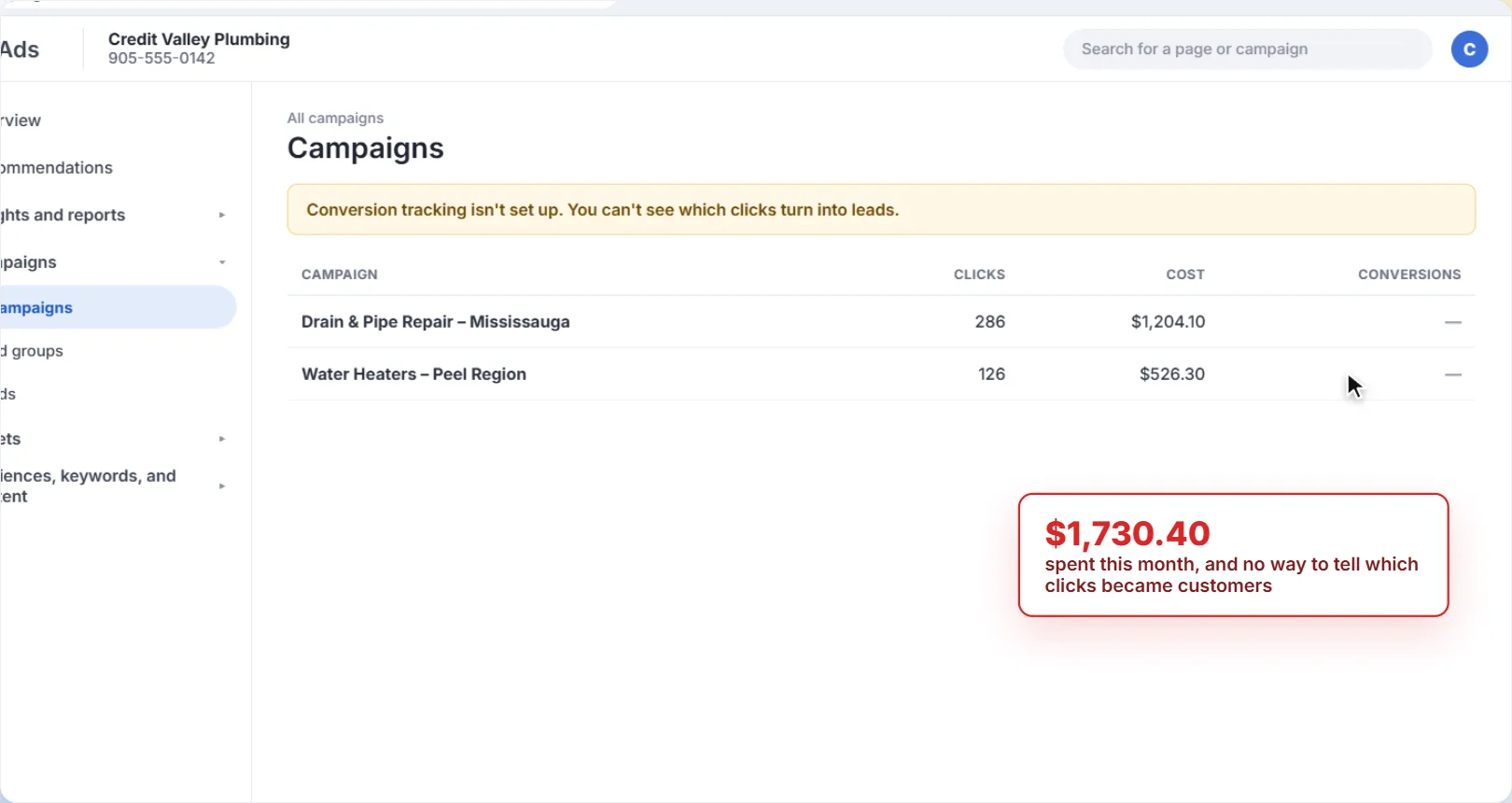
Before you start
Your website needs the Google tag, a small piece of code that tells Google Ads when someone lands on a page. Many sites already have it, for example through Google Analytics, Google Tag Manager or a WordPress or Shopify plugin. If you're not sure, Google checks for you in step 2. If the tag is missing, Google gives you the code at the end of the setup, and you or your web developer add it to every page of your site.
Check your thank-you page first. Send your own contact form and look at the address bar. If the page after sending has its own address, like /contact/thank-you, you can track it without any code. If the form just shows a message on the same page, you need the code method instead (see the table further down), or ask your web developer to add a thank-you page.
How to track form leads from your website
1Open Goals and click Create conversion action
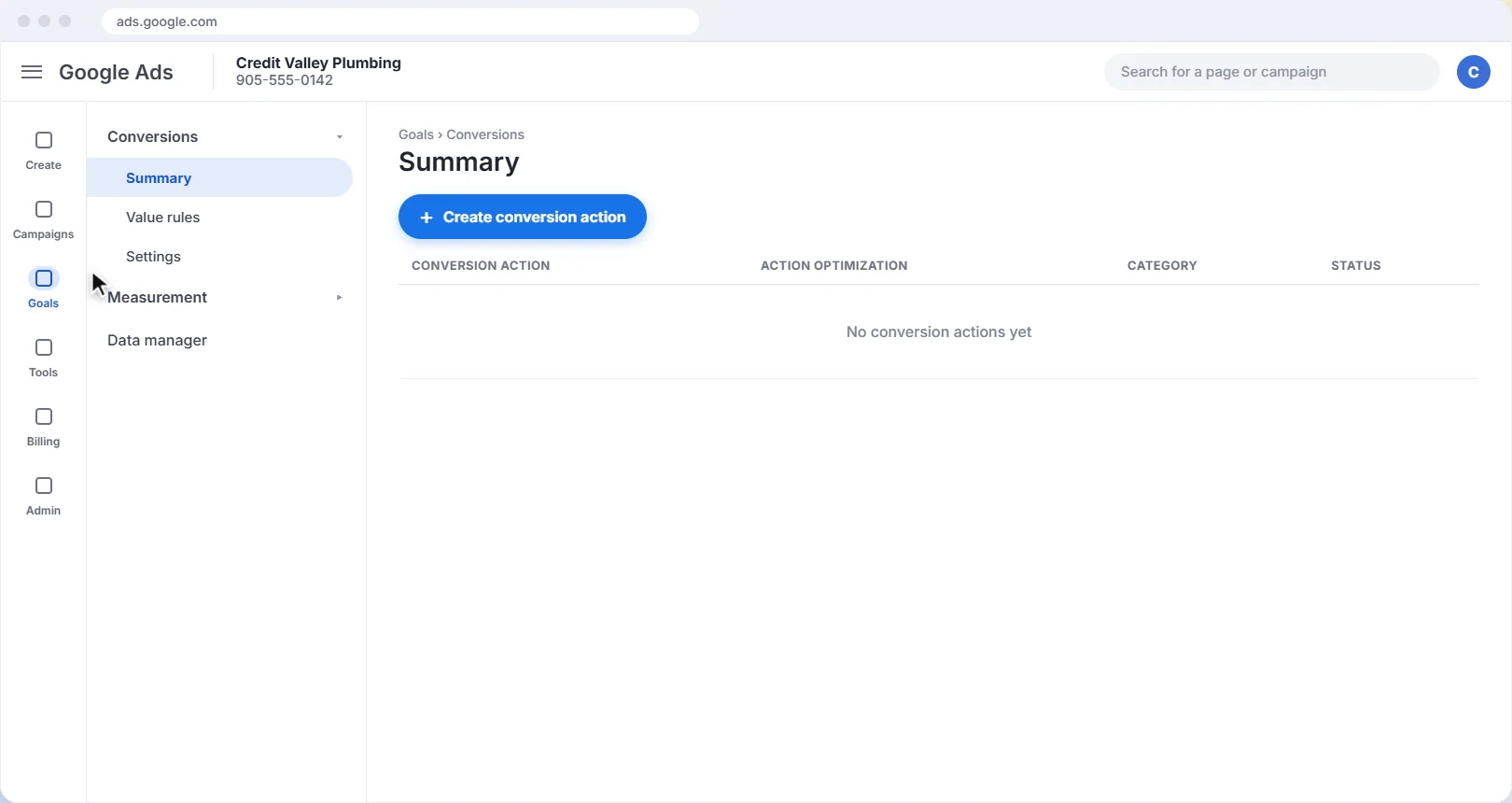
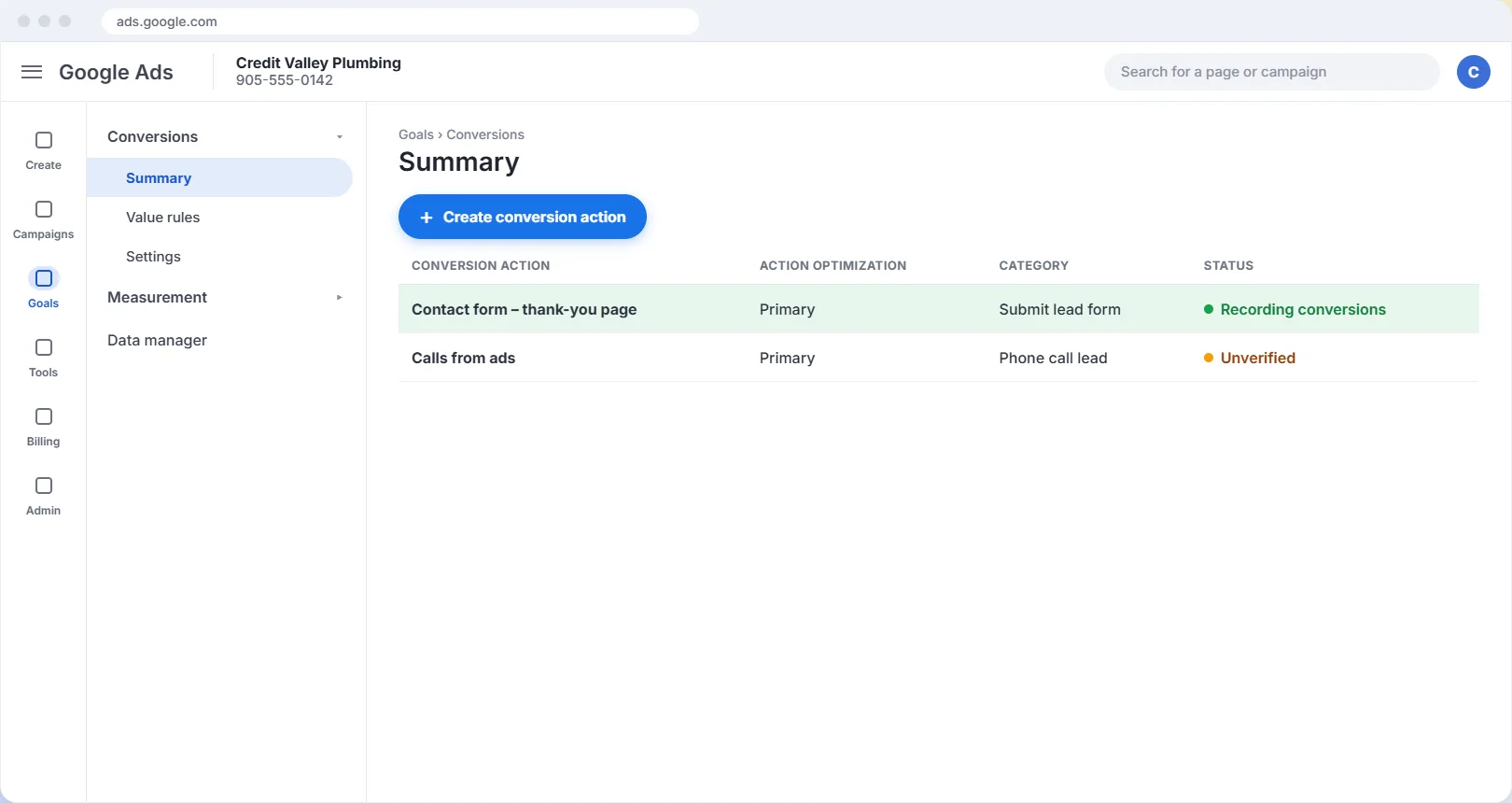
Click Goals in the left menu, open Summary under Conversions, and click + Create conversion action.
2Enter your website and click Scan
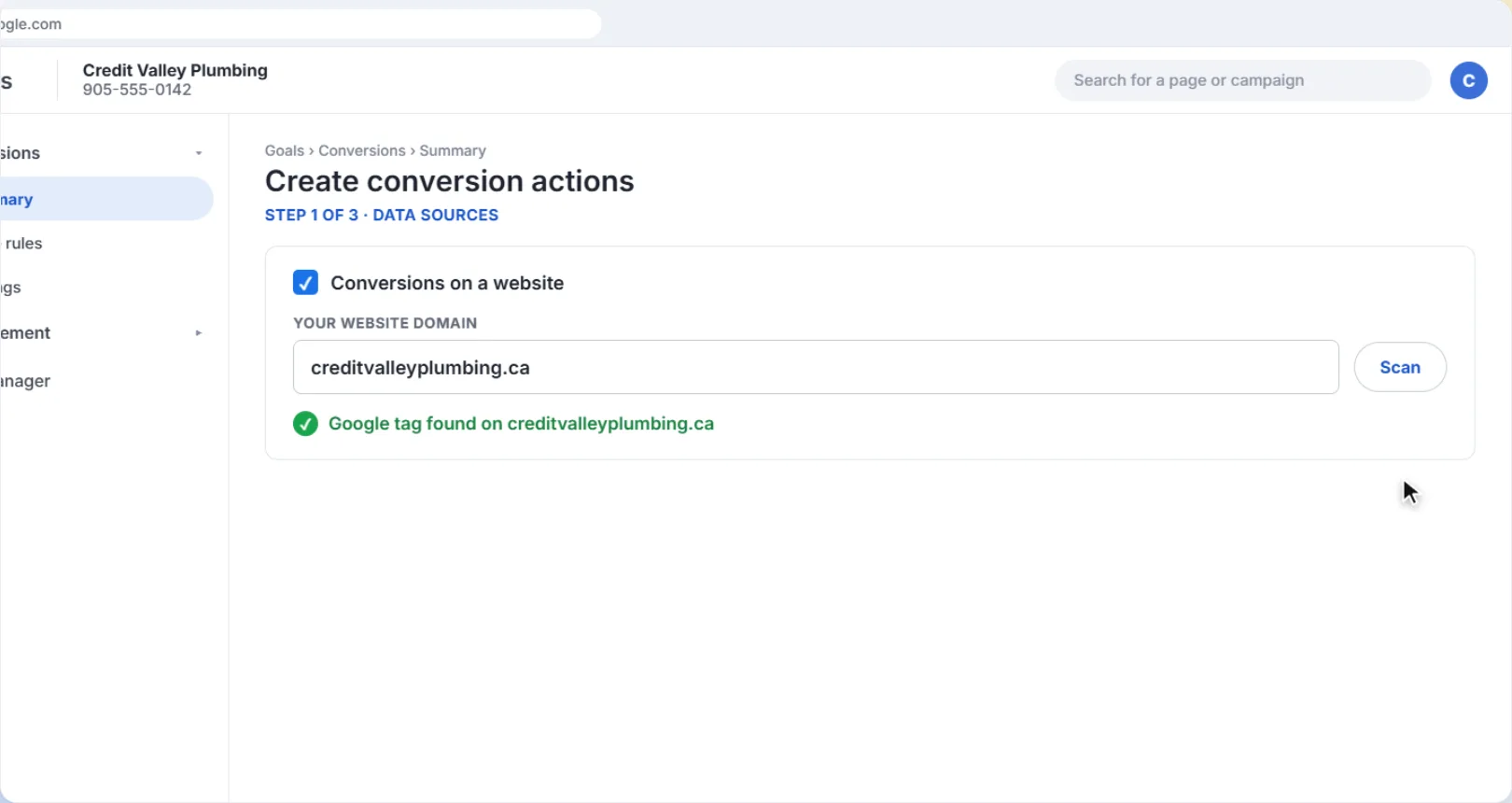
Choose Conversions on a website, type your website domain and click Scan. Google checks whether your site already has a Google tag or a linked Google Analytics property, then click Continue.
3Pick a category and set it up without code
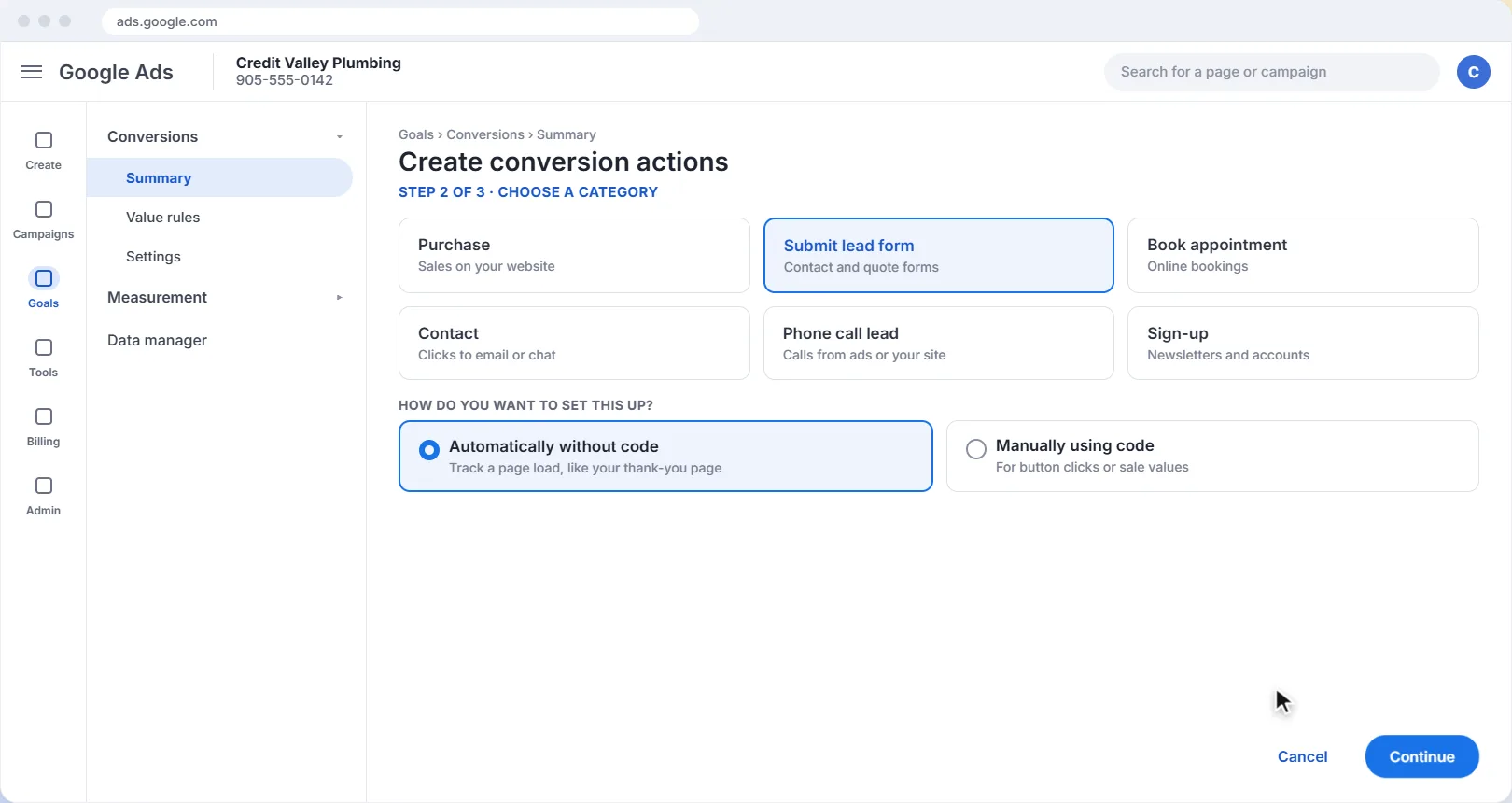
Choose the category that matches the action. For a contact or quote form, that's Submit lead form. Then choose to set it up automatically without code, which tracks a page load. The other option, manually using code, is for button clicks or sale amounts.
4Track your thank-you page
Set the event to Page load, the match type to URL contains, and enter the part of your thank-you page address that only that page has, like thank-you. Every time someone lands on that page, Google Ads counts a conversion.
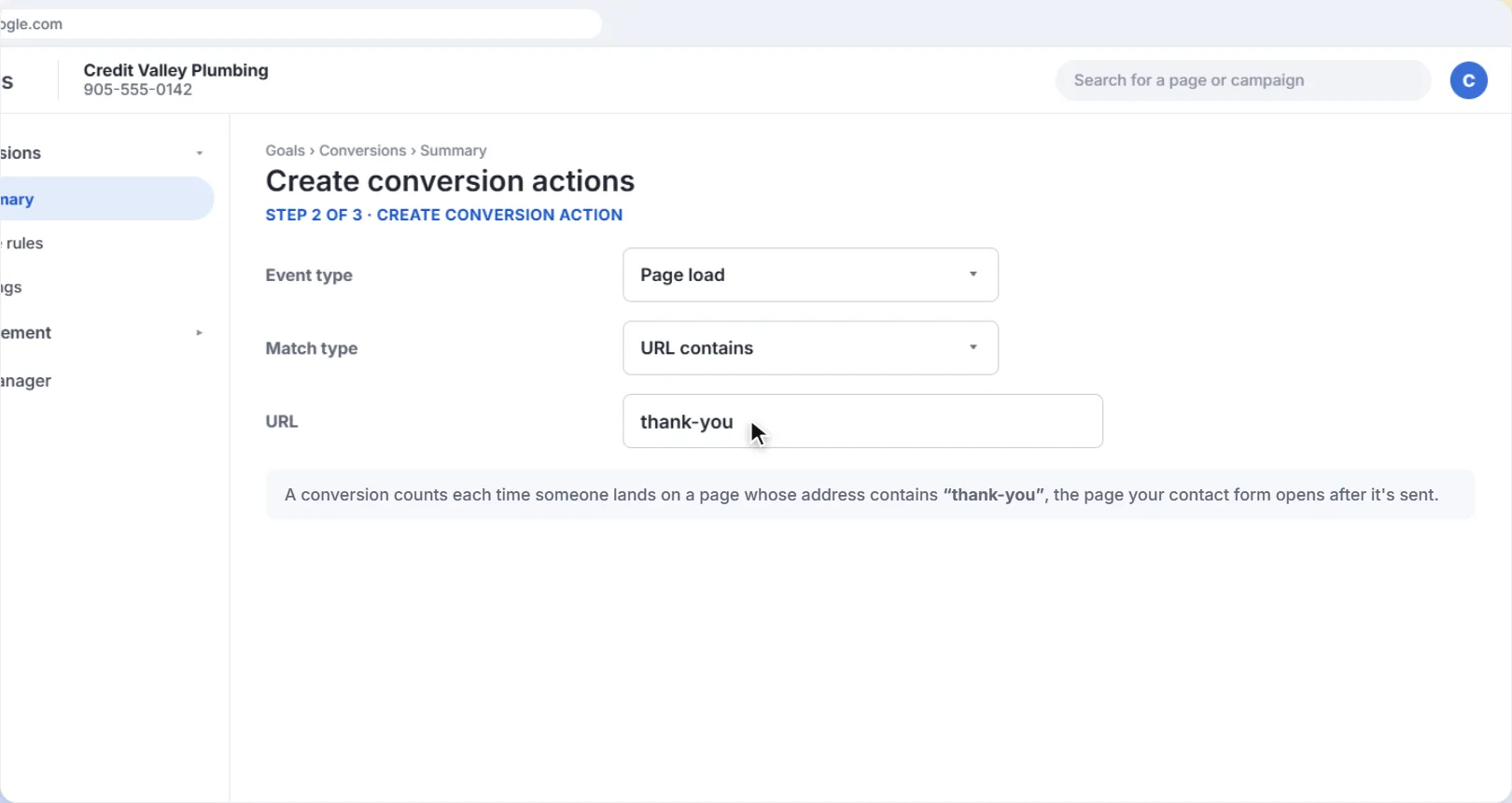
Make sure only that page matches. If your blog has a post called "Thank you to our customers", thank-you would match it too. Use a more specific part of the address, like contact/thank-you, or choose URL is with the full address.
5Check the settings and save
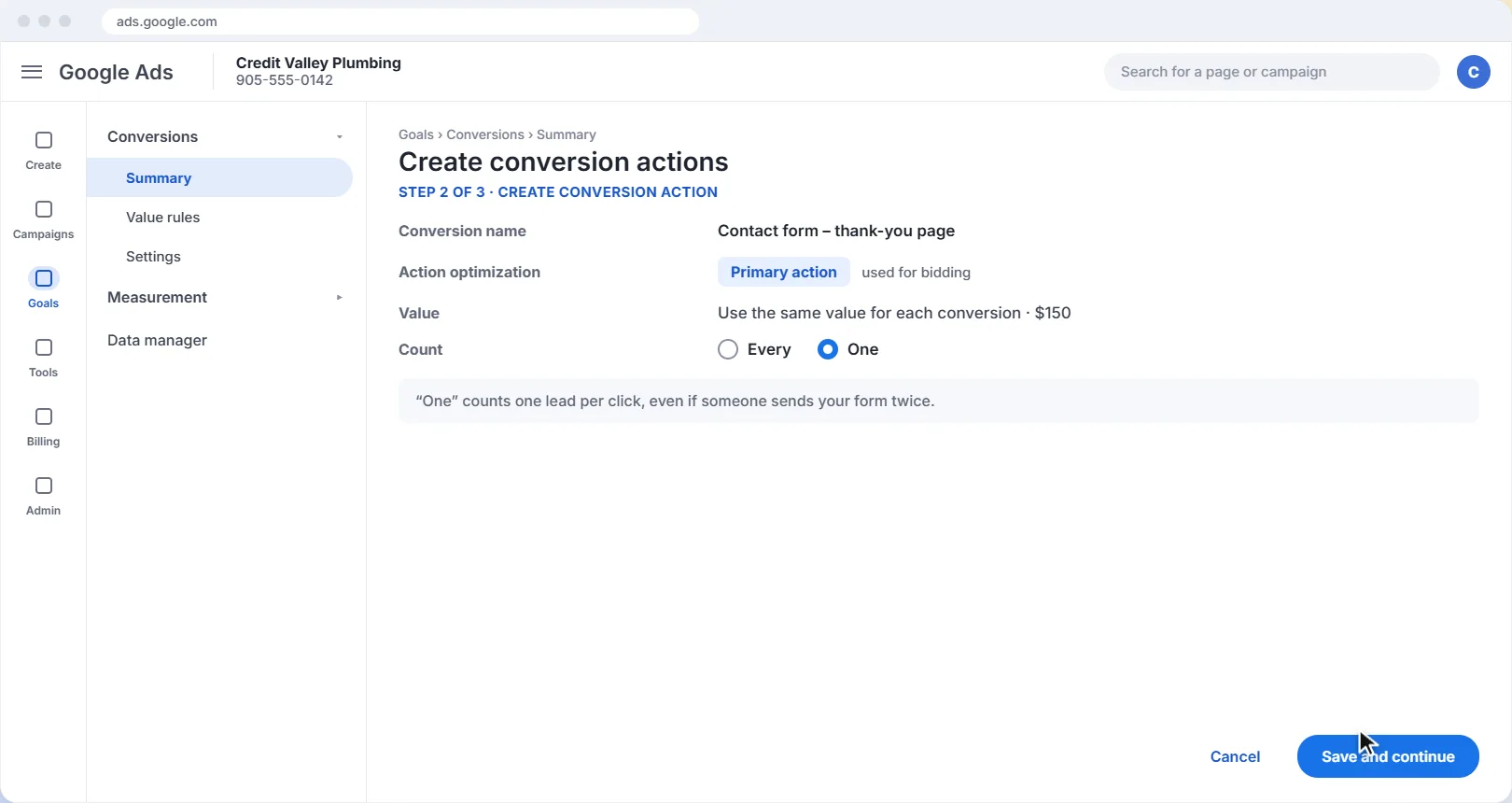
Open Conversion settings and check three things:
- Action optimization: keep it as a Primary action, so it counts in your Conversions column and guides bidding.
- Value: optional. If you know roughly what a lead is worth to you, enter it; otherwise leave it out.
- Count: choose One for leads, so a person who sends your form twice counts as one lead. Use Every for sales, where each purchase matters.
Then click Save and continue. Your new conversion action shows on the Summary page with the status Unverified until it records its first conversion.
How to track phone calls
6Add calls from ads with a minimum call length
Click + Create conversion action again and choose Phone calls, then Calls from ads using call assets. Set a call length, like 60 seconds, so only real conversations count, not wrong numbers or hang-ups. This needs a call asset (or a location asset with a phone number) on your ads and call reporting turned on.
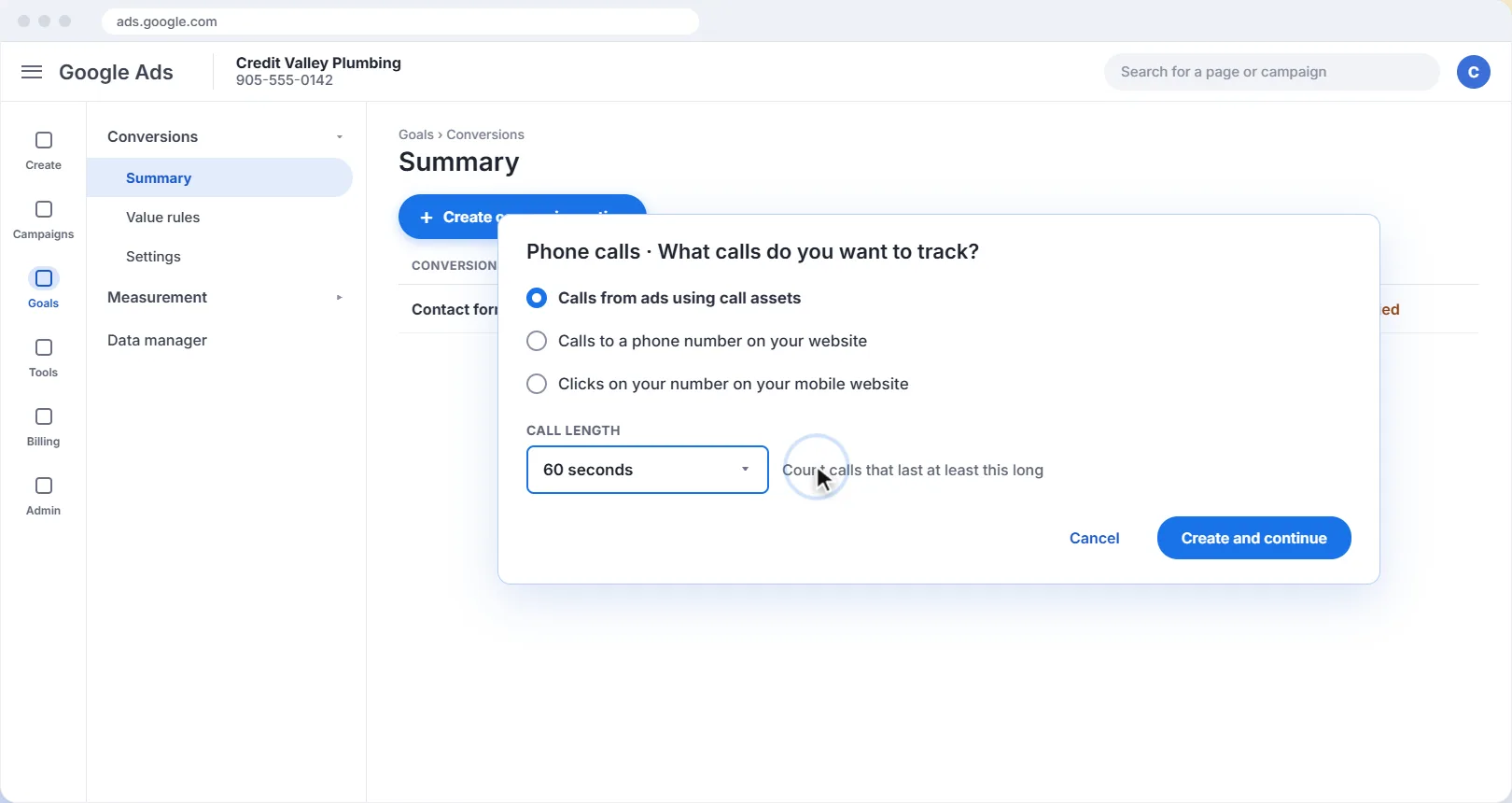
Google offers a few ways to track calls. Here's which to use:
| Call type | What it counts | Setup |
|---|---|---|
| Calls from ads | Calls made by tapping the number in your ad | A call asset and call reporting. No website changes. |
| Calls to a number on your website | Calls from people who clicked your ad, then called the number on your site | The Google tag plus a phone snippet that shows a Google forwarding number to ad visitors. |
| Clicks on your number on your mobile website | Taps on your phone number on mobile (the tap, not the call itself) | The Google tag plus an event snippet on the phone link. |
Test it
7Test with Tag Assistant
Open Google Tag Assistant, connect it to your website, and send your own contact form. On the thank-you page, Tag Assistant should show your Google tag as found and your conversion as fired. If the tag isn't found, it isn't installed on that page; if the conversion doesn't fire, check the URL you entered in step 4.
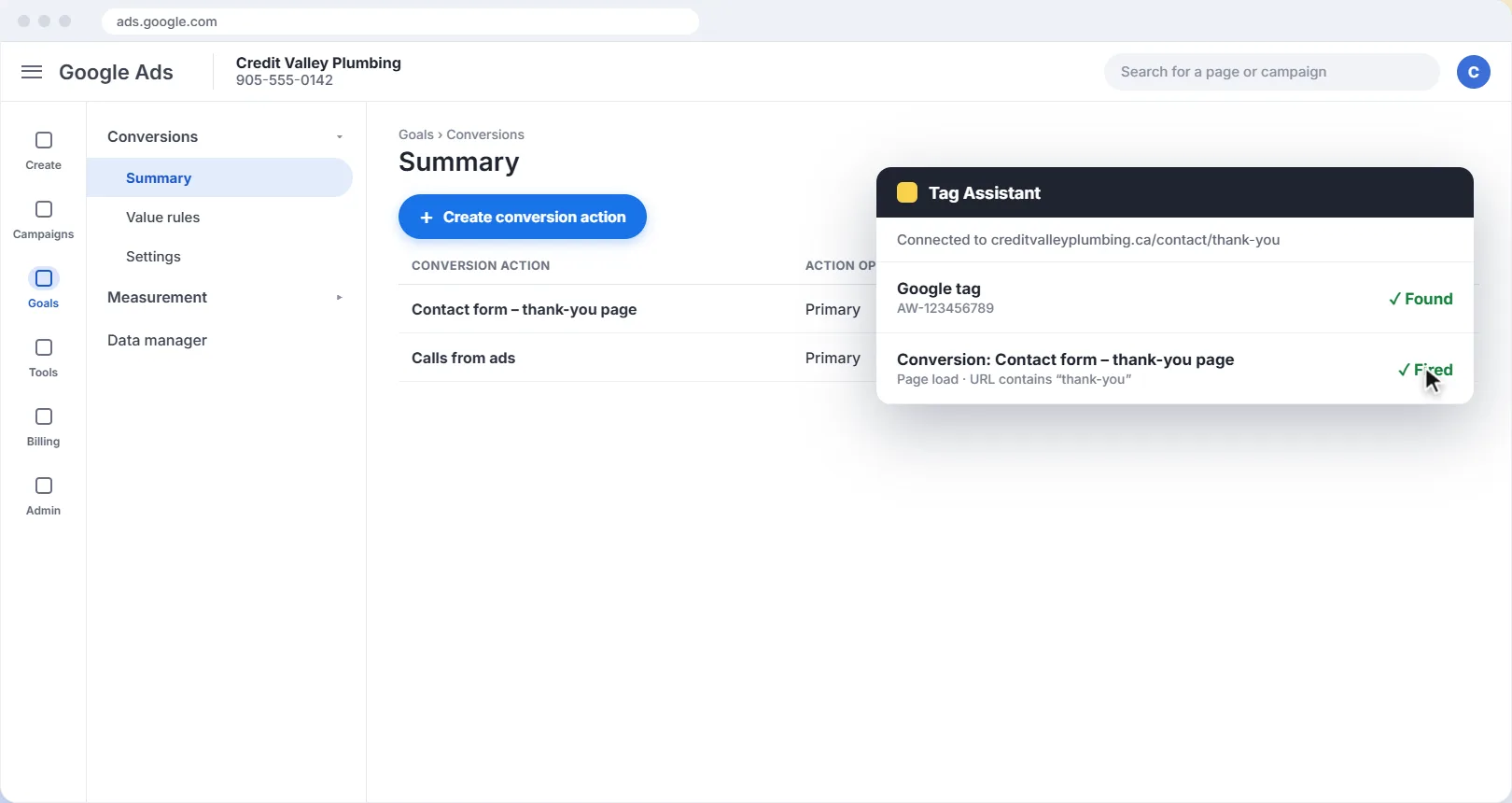
Back on the Summary page, the status changes from Unverified to Recording conversions once real conversions come in. It can take a few hours to update.
Primary or secondary?
| Setting | Where it shows | Use it for |
|---|---|---|
| Primary | The Conversions column, and used for bidding | The things you actually want: leads, booked jobs, qualified calls |
| Secondary | Only the All conv. column, not used for bidding | Things worth watching but not worth paying for, like clicks on your email address or page scrolls |
Don't count the same lead twice. If a website plugin, Google Analytics and Google Ads all record the same form as primary conversions, every lead counts two or three times and your numbers look better than they are. Keep one primary action per real-world result, and set the rest to secondary.
Now put the data to work
- Find what brings in leads. After a few weeks, use the search terms report to see which searches led to conversions, and add negative keywords for the ones that never do.
- Check your hours. With conversions tracked, the Day and Hour view shows when leads actually come in, so you can set an ad schedule with real numbers behind it.
- Get more calls. If phone calls are your main lead, add a call asset so people can call straight from the ad.
- Lots of clicks, few conversions? The problem is often the page, not the ads. Compare your numbers with typical conversion rates by industry.
- Ads not running at all? Start with why your Google Ads aren't showing.
Want help with your Google Ads?
We set up conversion tracking, campaigns and landing pages for local businesses in Mississauga and across the GTA, so you know exactly which clicks turn into customers.
See our Google Ads managementThe screens in this guide are simplified illustrations of Google Ads; Google updates its layout often, so labels may differ slightly in your account. Google's own guides: Set up your web conversions, Measure calls from ads and About primary and secondary conversion actions. The plumbing business and figures are examples.
Frequently asked questions
Do I need code to set up Google Ads conversion tracking?
Not if your form opens a thank-you page. Once the Google tag is on your site, you can track that page load without any extra code. You need code (or Google Tag Manager) for button clicks, forms that don't change the page, or sale values. If your site has no Google tag yet, Google gives you the code to add, or your web developer can add it.
How do I set up conversion tracking on a WordPress site?
The steps in Google Ads are the same. On WordPress, the Google tag is usually added with Google's Site Kit plugin, a Google Tag Manager plugin or your theme's header settings. Add it in one place only: two plugins adding the same tag can count each lead twice. Then track your form's thank-you page as shown in this guide.
How long does it take for conversions to show in Google Ads?
After setup, the action shows as Unverified until it records a conversion. Once real conversions come in, the status changes to Recording conversions. Conversions are reported against the date of the ad click, not the date of the lead, so recent days can keep filling in.
What is the difference between primary and secondary conversions?
Primary conversions show in the Conversions column and are used for bidding. Secondary conversions show only in the All conversions column and are for observation. Keep the actions you actually want, like leads and qualified calls, as primary, and set things you just want to watch to secondary.
Should I count every conversion or just one?
For leads, choose One, so someone who sends your form twice after one click counts as one lead. For sales, choose Every, because each purchase has its own value. Most local service businesses should use One.
How do I track phone calls from Google Ads?
Add a call asset and turn on call reporting, then check the Calls from ads conversion action and set a minimum call length, such as 60 seconds, so short calls don't count. To also track people who click your ad and then call the number on your website, add Google's phone snippet so ad visitors see a Google forwarding number. If tracking is set up but leads are low, see how to use the search terms report or let us handle it through our Google Ads management.
More Google Ads guides

How Much Should I Spend on Google Ads?
Multiply a typical cost per click for your keywords by the clicks you want each day (often 10 to 20 for a local business) to get your average daily budget. Over a month, Google won't charge more than 30.4 times that daily amount. Set it under Campaigns › Campaigns by clicking the pencil in the Budget column, then raise it only when the clicks are turning into customers.
1:27 video · 6 min read

Google Ads Keyword Match Types Explained (Broad, Phrase, Exact)
Google Ads has three keyword match types. Broad match (the default, no symbols) can show your ad on related searches. Phrase match ("in quotes") shows on searches that include your keyword's meaning. Exact match ([in brackets]) shows only on searches with the same meaning or intent. On a small budget, start with phrase and exact for your main services.
1:27 video · 7 min read

Why Are My Google Ads Not Showing? (And How to Fix It)
Start with the Status column on your Campaigns page and hover over it for the reason. The usual causes are a paused or ended campaign, a billing problem, a disapproved ad, keywords with low search volume, or a budget or bid that's too low. Check with the Ad preview and diagnosis tool, not by searching for your own ad.
1:25 video · 6 min read

How to Use the Search Terms Report in Google Ads
Open your campaign, go to Insights and reports › Search terms, set the date range, and sort by Cost. Tick searches that cost money but don't fit your business and click Add as negative keyword; add searches that bring in customers as keywords.
1:34 video · 6 min read

How to Add a Call Button to Your Google Ads (Call Assets)
In Google Ads, go to Campaigns › Assets, click +, choose Call, pick the campaign, enter your country and phone number, optionally set a schedule for your business hours, and save. People searching on their phones can then tap a Call button right on your ad.
1:18 video · 5 min read

How to Set an Ad Schedule in Google Ads
Open Campaigns › Ad schedule, click the pencil icon, pick your campaign, add the days and hours you want your ads to run (for example Monday to Friday, 7:00 AM to 7:00 PM), and save. Outside those hours your ads stop showing, so you aren't paying for clicks nobody can answer.
1:14 video · 5 min read

How to Target Your Service Area in Google Ads
Open your campaign, click Settings › Locations, choose Enter another location › Advanced search › Radius, enter your address and how far you travel, then open Location options and choose Presence. Save, and your ads focus on people who are actually in your service area.
1:20 video · 5 min read
How to Add Negative Keywords in Google Ads (Step by Step)
Open your campaign, go to Audiences, keywords, and content › Search keywords › Negative search keywords, click +, type the words you want to block (like jobs or diy), choose the campaign or ad group, and save. Your ads stop showing for searches that contain those words.
1:15 video · 5 min read