
Google Ads Keyword Match Types Explained (Broad, Phrase, Exact)
By Adrian Chromenko, primarydm.com·November 22, 2026·7 min read
Quick answer
Google Ads has three keyword match types. Broad match (the default, no symbols) can show your ad on related searches. Phrase match ("in quotes") shows on searches that include your keyword's meaning. Exact match ([in brackets]) shows only on searches with the same meaning or intent. On a small budget, start with phrase and exact for your main services.
Every keyword in Google Ads has a match type. It decides how closely a person's search has to match your keyword before your ad can show. There are three: broad, phrase and exact. Pick the wrong one and you either pay for searches that will never hire you, or you miss the ones that would. Watch the video above, or read on for what each type matches and how to set it.
The three match types at a glance
| Match type | How you type it | Your ad can show on | Reach |
|---|---|---|---|
| Broad (default) | drain cleaning | Searches related to your keyword, even ones that don't use your words | Most searches |
| Phrase | "drain cleaning" | Searches that include the meaning of your keyword | In between |
| Exact | [drain cleaning] | Searches with the same meaning or intent as your keyword | Fewest searches |
Broad match
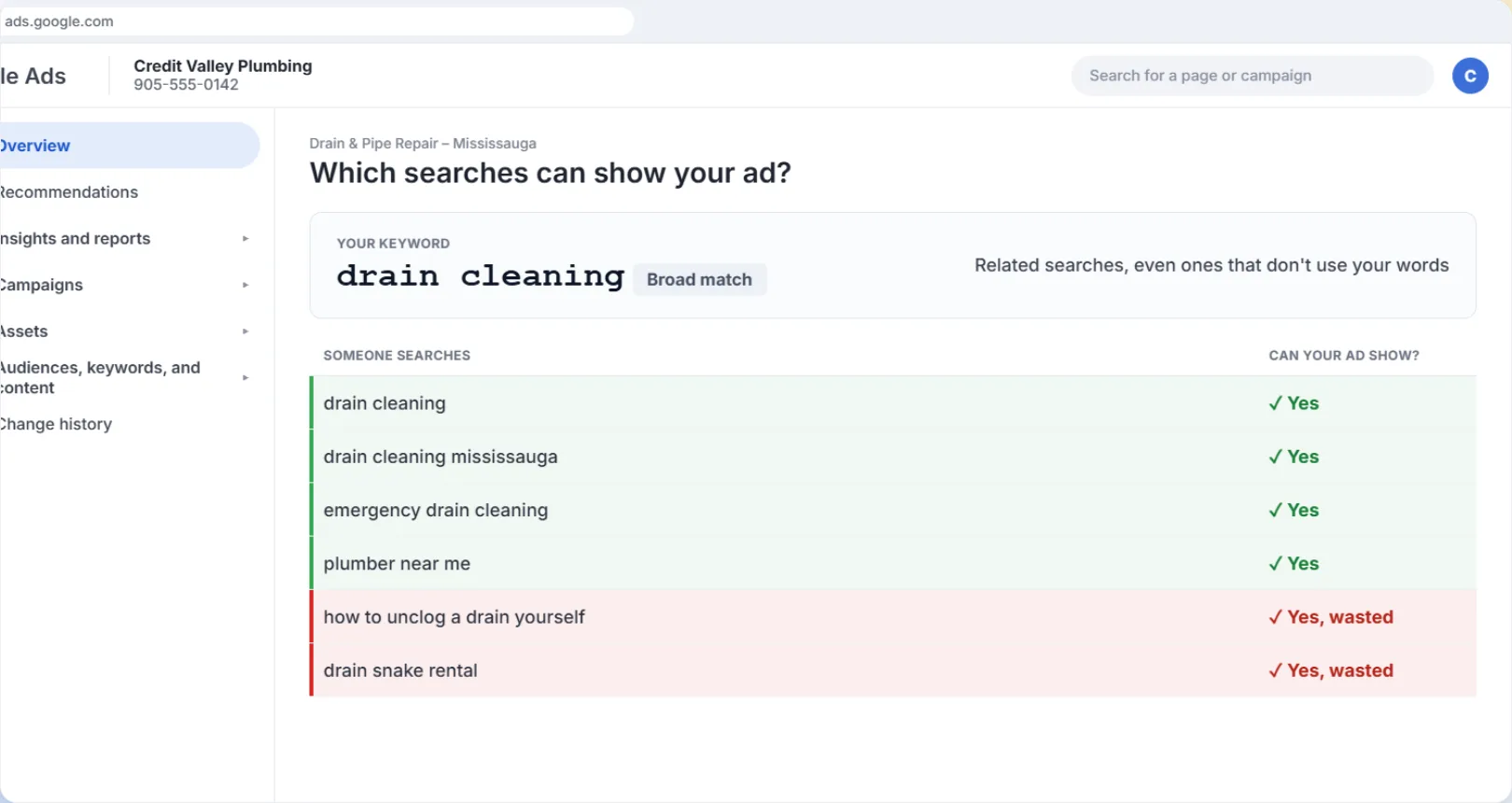
Broad match is the default: if you type a keyword without any symbols, it's broad. Google can show your ad on searches it considers related to your keyword, using signals like the rest of your ad group and the person's recent searches. That reaches the most people, but it also reaches people you don't want. A plumber bidding on drain cleaning can end up paying for how to unclog a drain yourself or drain snake rental.
Phrase match
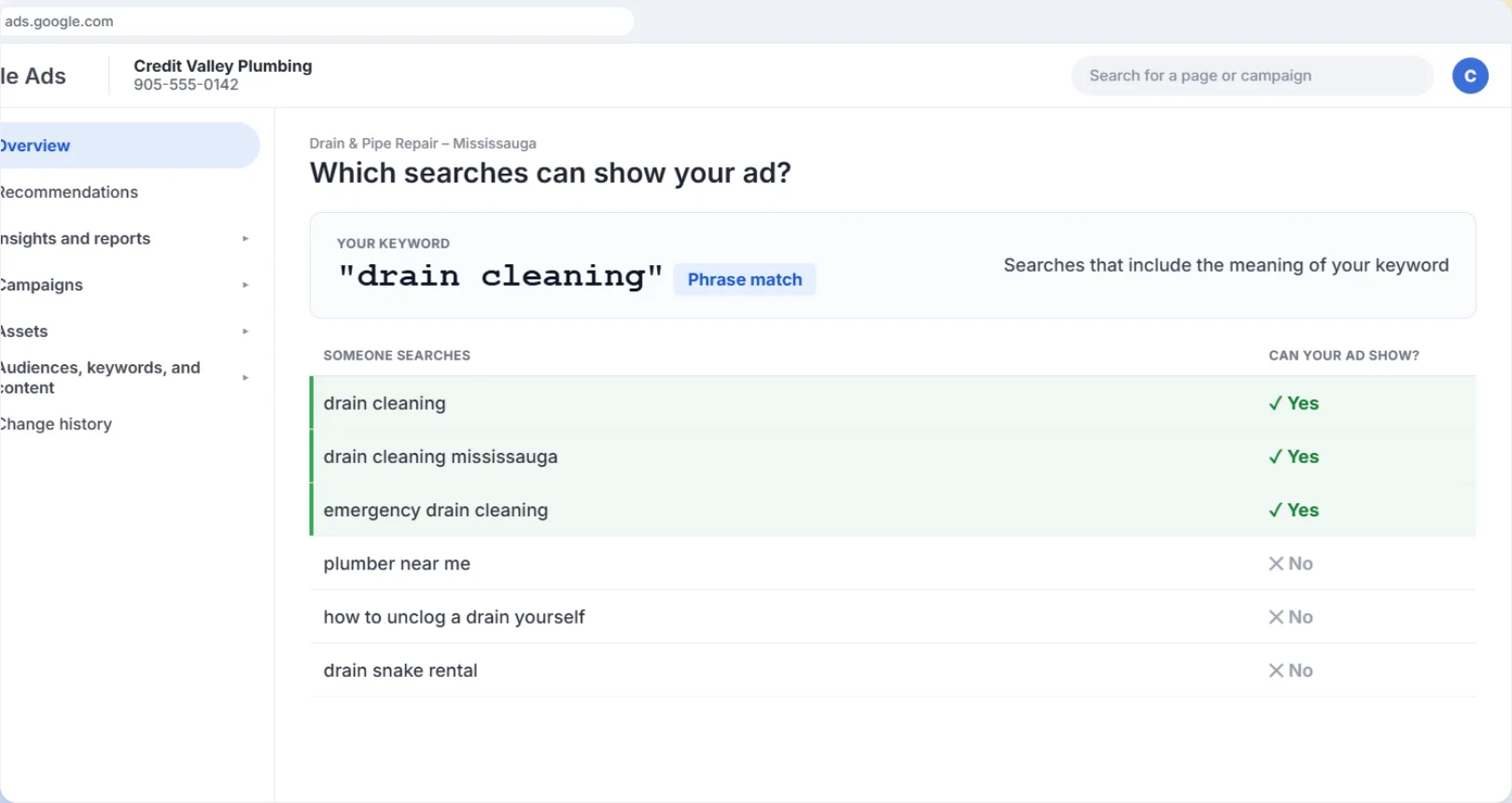
Put the keyword in quotation marks for phrase match. Your ad can show on searches that include the meaning of your keyword, usually with extra words before or after it: drain cleaning mississauga, emergency drain cleaning. It cuts out most of the loosely related searches broad match picks up, while still catching the many ways people phrase a request.
Exact match
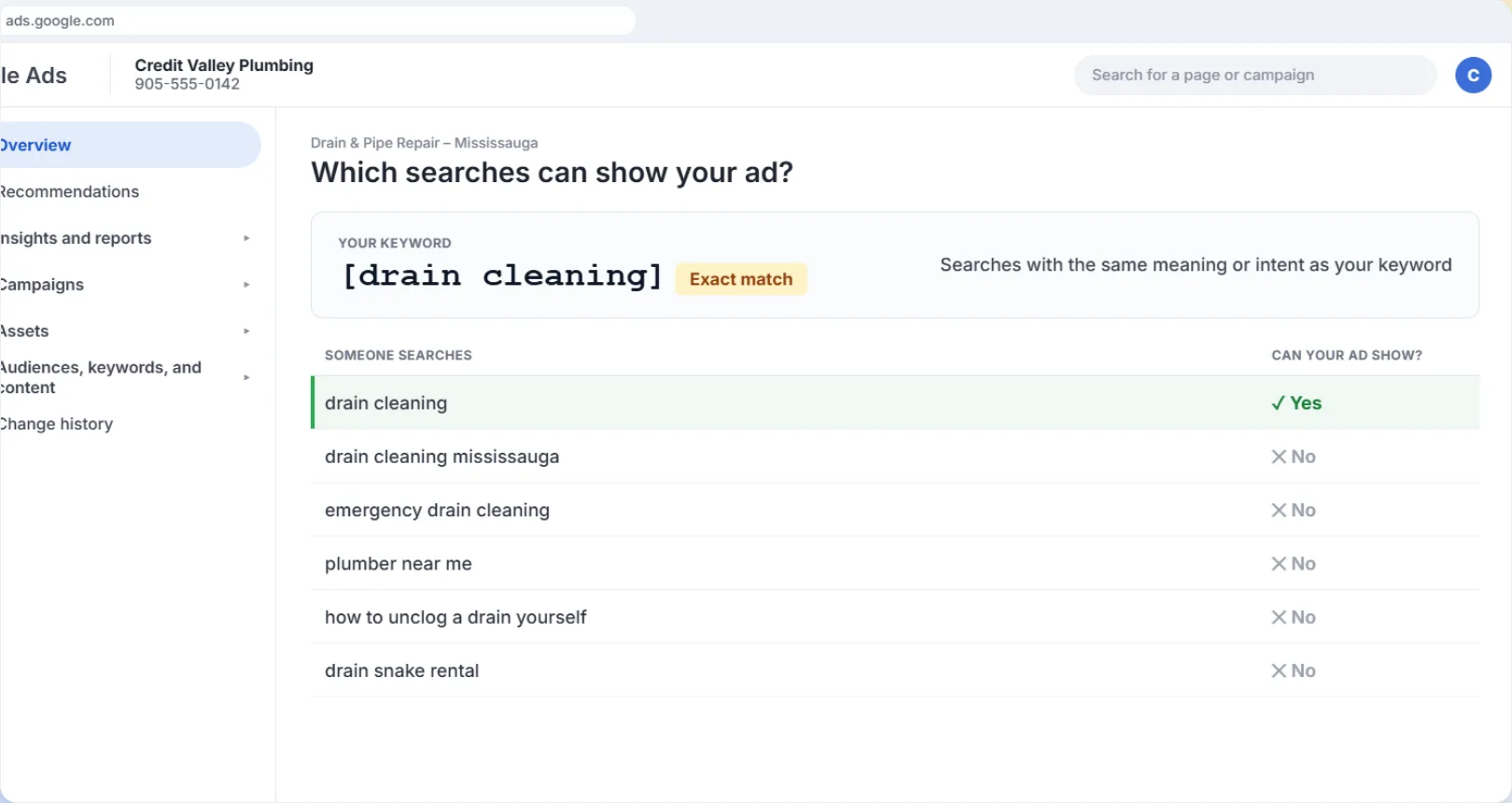
Put the keyword in square brackets for exact match. Your ad can only show on searches with the same meaning or intent as the keyword. Google still counts close variants, like plurals, misspellings and reordered words, as a match, but it won't add extra meaning. It gives you the most control and the fewest clicks.
How to set or change a match type
1Open Search keywords
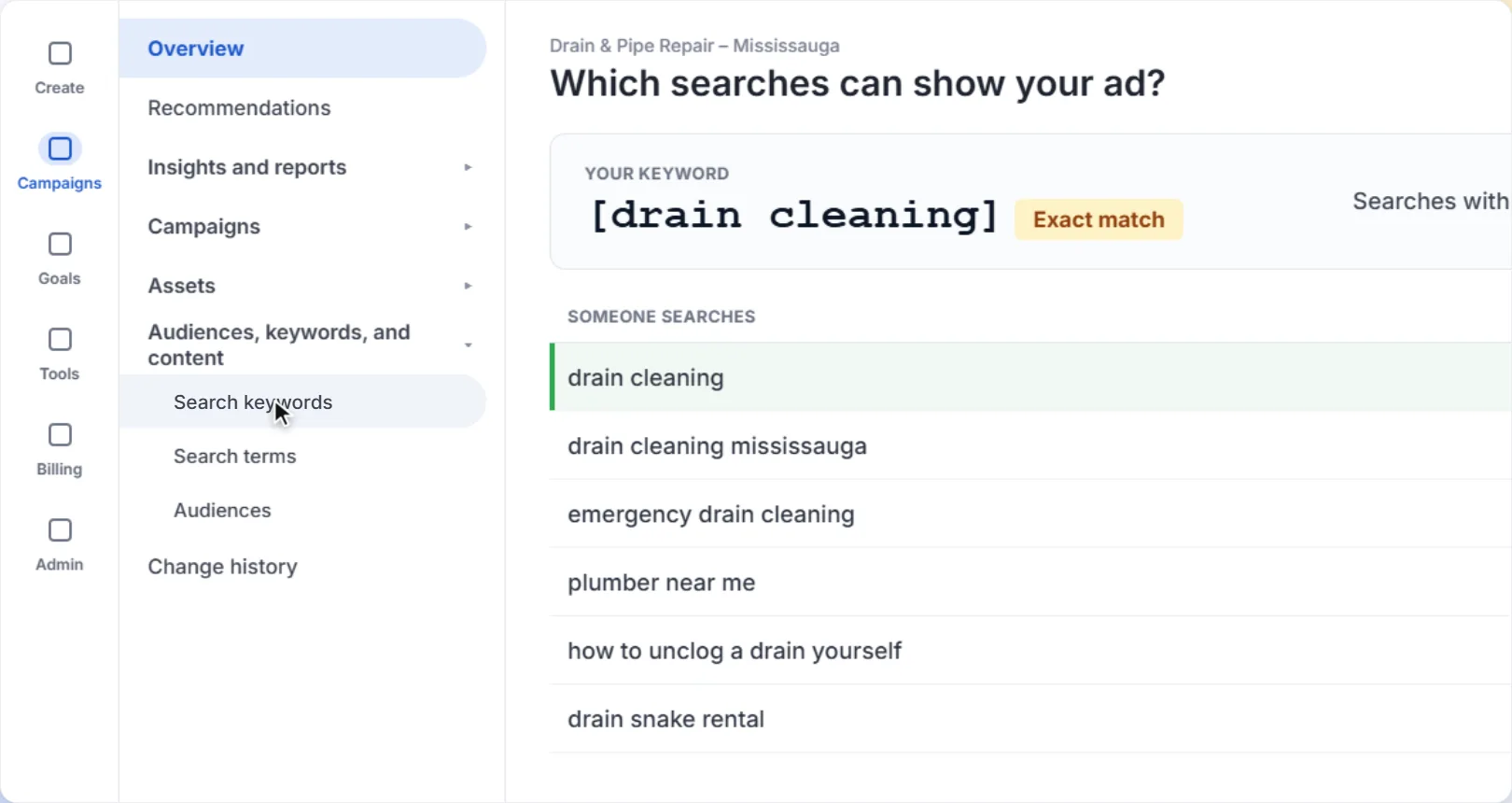
In the left menu, open Audiences, keywords, and content and click Search keywords. Pick the campaign and ad group you want to work on.
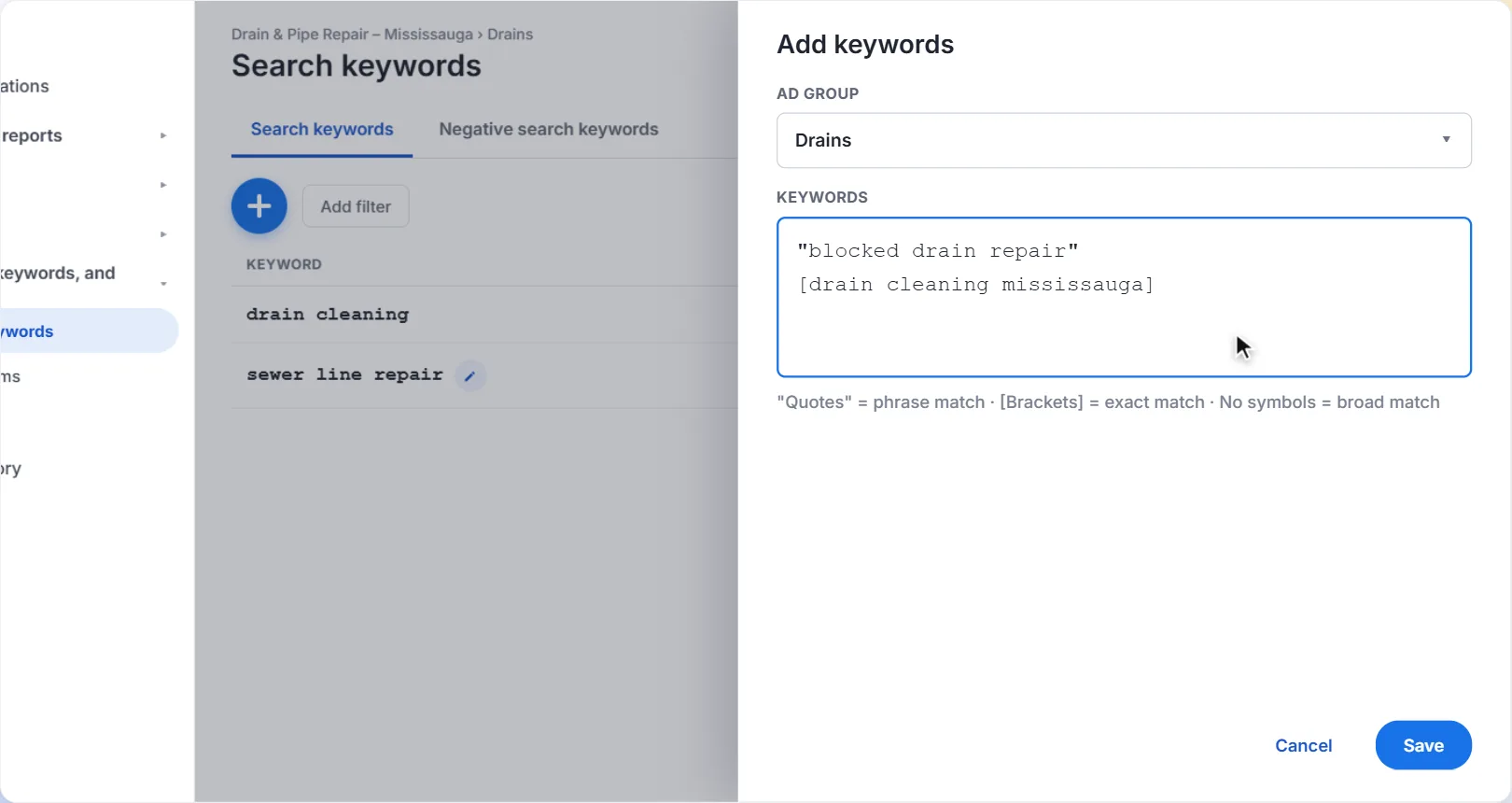
2Click the plus button and type your keywords
Click the blue plus button, choose the ad group, and type one keyword per line. The symbols set the match type:
"blocked drain repair"in quotes is phrase match.[drain cleaning mississauga]in square brackets is exact match.- A keyword with no symbols is broad match.
3Save and check the Match type column
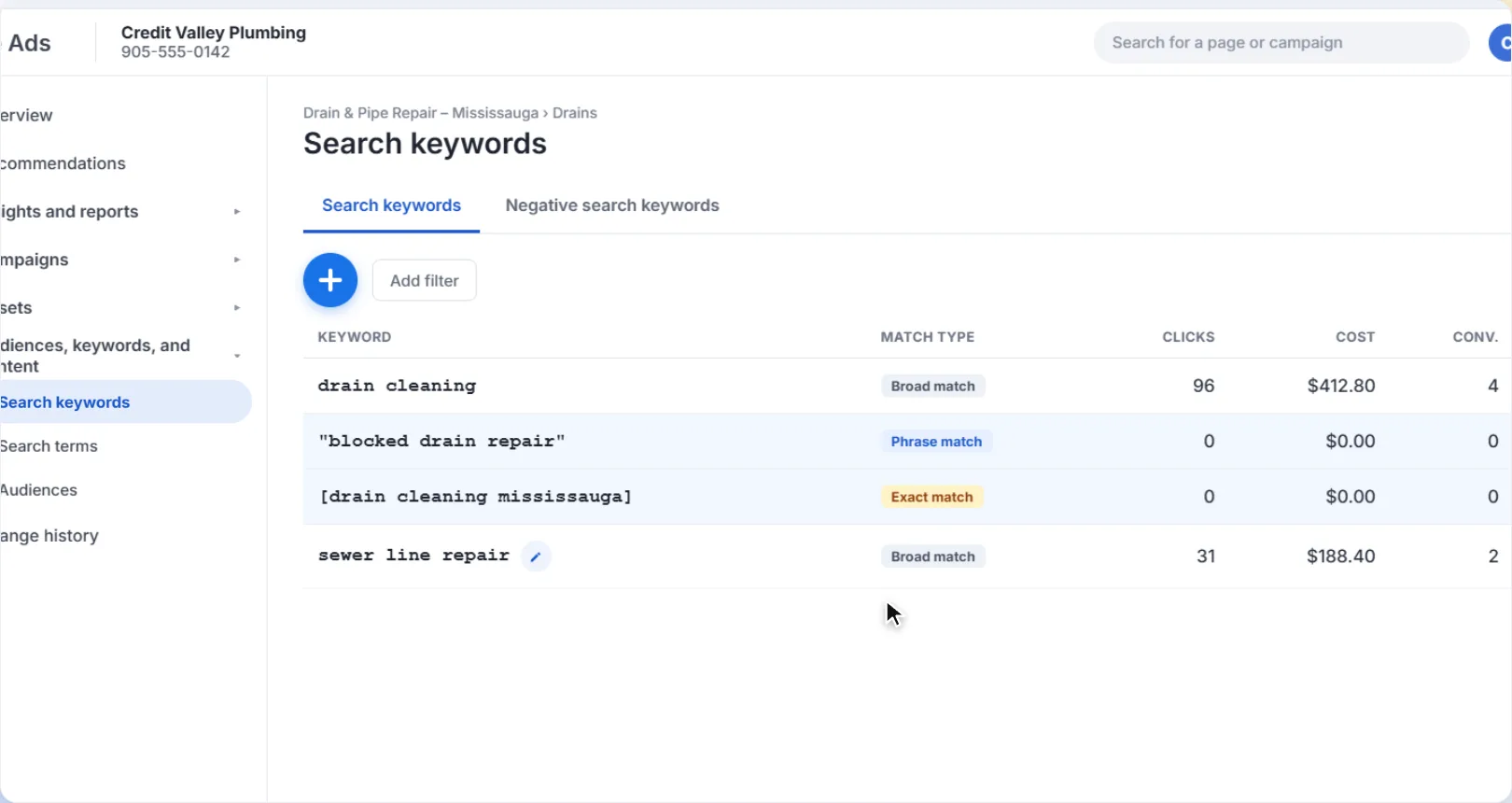
Click Save. Your keywords now appear in the list, and the Match type column shows how each one matches. If you see a broad match keyword you didn't mean to add, it's usually a missing quote or bracket.
4Change an existing keyword with the pencil icon
To change a keyword's match type, hover over it, click the pencil icon, pick the new match type and save. To change several at once, tick their boxes, click Edit and choose Change match types.
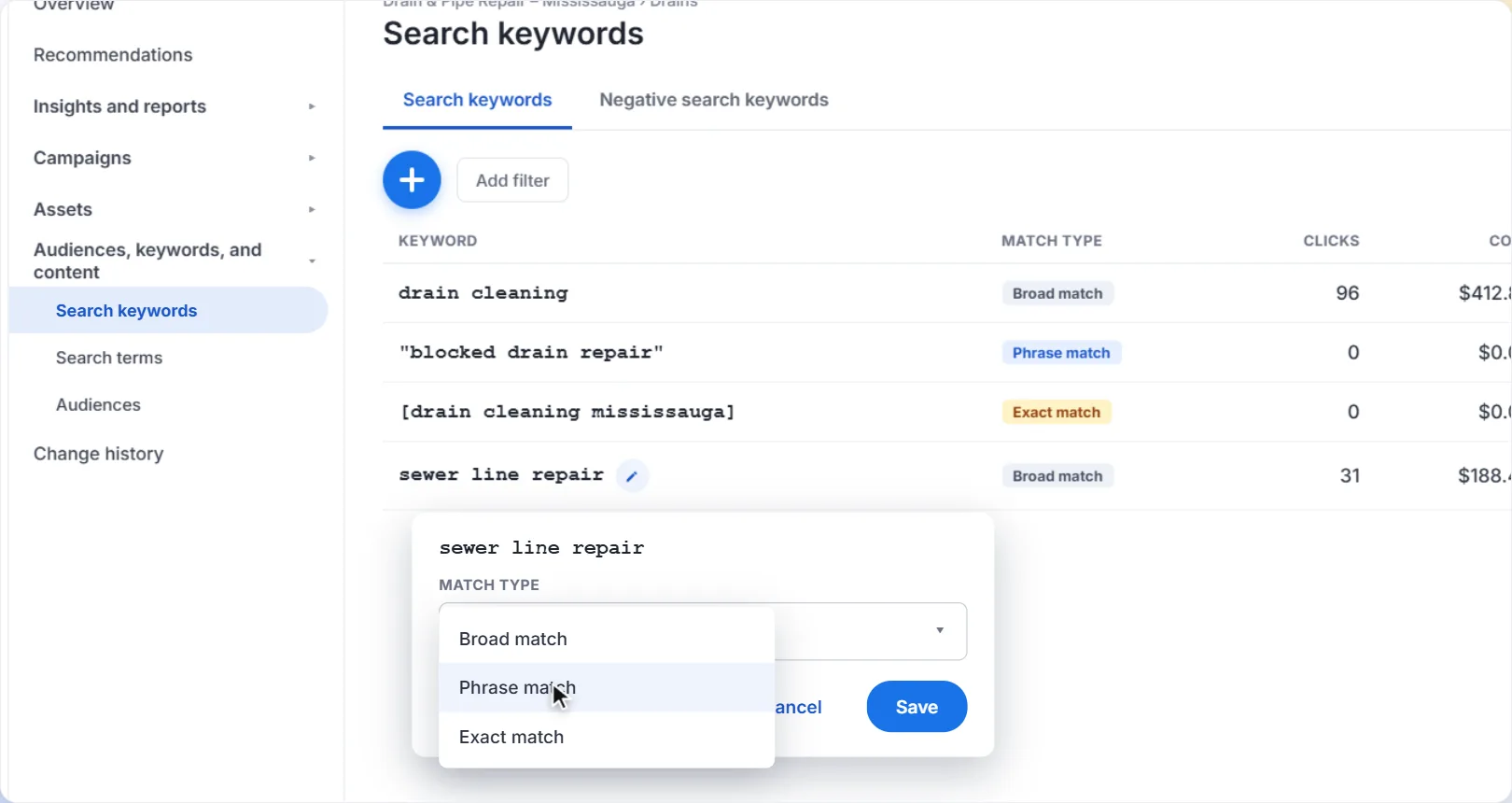
Changing a match type starts the keyword fresh. Google removes the old keyword and creates a new one, so the old clicks and conversions stay with the removed version. Note how the keyword was doing before you change it.
Which match type should a small local business use?
There's no single right answer, but on a budget of a few hundred to a couple of thousand dollars a month, this works well for most service businesses:
- Start with phrase and exact match for your main services, like
"furnace repair"and[furnace repair mississauga]. Every click costs money, so keep them on target while you learn what works. - Add broad match once you track conversions. Google says broad match works best with Smart Bidding (like Maximize conversions), because the bidding uses your conversion data to decide which related searches are worth paying for. Without conversion tracking, broad match is mostly guessing with your money.
- Block the obvious waste from day one. Add negative keywords like free, jobs, diy and how to, whatever match type you choose.
- Check your search terms every week. The search terms report shows the actual searches each keyword matched. It's the only way to know if a match type is too loose or too tight.
Too few impressions? If your ads barely show with exact match, the searches may just not exist in your area. Loosen one or two keywords to phrase match, and check your service area isn't too small. More causes are in why your Google Ads aren't showing.
Negative keywords use match types too, but differently
Negative keywords also come in broad, phrase and exact, but they're stricter than regular keywords:
| Negative keyword | Blocks your ad when the search |
|---|---|
Broad: drain snake | Contains all the words, in any order (snake for drain is blocked) |
Phrase: "drain snake" | Contains the words in that order (rent a drain snake is blocked) |
Exact: [drain snake] | Is exactly those words and nothing else |
The big difference: negative keywords don't match close variants or synonyms. Blocking job won't block jobs, and blocking cheap won't block inexpensive. Add the plural and the common alternatives yourself. Our guide on how to add negative keywords walks through it.
A few more tips
- Old "+keyword" notation is gone. Broad match modifier was retired in 2021. Any old
+drain +cleaningkeywords now behave like phrase match. - Don't duplicate the same keyword in every match type by default. Google prefers an exact match keyword when it's identical to the search, so a clear structure is easier to read than three copies of everything.
- Let people call you from the ad. Tight keywords bring in people ready to hire, so add a call asset and set an ad schedule for the hours someone can pick up.
Want help with your Google Ads?
Our Google Ads management covers keyword research, match types, negative keywords and weekly search term reviews for local businesses in Mississauga and across the GTA, plus landing pages that turn clicks into customers.
Get help with your Google AdsThe screens in this guide are simplified illustrations of Google Ads; Google updates its layout often, so labels may differ slightly in your account. Which searches match a keyword is decided by Google and changes over time; the examples show typical behaviour. Google's own guides: About keyword matching options, Edit keywords and About negative keywords. The plumbing business and figures are examples.
Frequently asked questions
What is the default keyword match type in Google Ads?
Broad match. Any keyword you add without quotes or brackets is broad match, which reaches the most searches, including some only loosely related to your keyword.
Which match type is best for a small business?
On a limited budget, phrase and exact match for your main services keep clicks on target. Add broad match once you track conversions and use Smart Bidding, and check the search terms report weekly whichever you use.
How do I change a keyword's match type?
Go to Audiences, keywords, and content › Search keywords, click the pencil icon next to the keyword, choose the new match type and save. For several keywords, tick them, click Edit and choose Change match types. The change creates a new keyword, so the old stats stay with the removed version.
Does exact match only show for the exact words?
No. Exact match also covers close variants with the same meaning or intent, such as plurals, misspellings and reordered words. It won't show for searches that add a different meaning.
Do negative keywords work the same way?
No. Negative keywords don't match close variants or synonyms, so blocking "job" doesn't block "jobs". Add plurals and alternatives yourself. See how to add negative keywords.
What happened to broad match modifier (+keyword)?
Google retired it in 2021. Existing broad match modifier keywords now behave like phrase match, and you can't add new ones.
More Google Ads guides
How to Use the Search Terms Report in Google Ads
Open your campaign, go to Insights and reports › Search terms, set the date range, and sort by Cost. Tick searches that cost money but don't fit your business and click Add as negative keyword; add searches that bring in customers as keywords.
1:34 video · 6 min read
How to Add Negative Keywords in Google Ads (Step by Step)
Open your campaign, go to Audiences, keywords, and content › Search keywords › Negative search keywords, click +, type the words you want to block (like jobs or diy), choose the campaign or ad group, and save. Your ads stop showing for searches that contain those words.
1:15 video · 5 min read
How Much Should I Spend on Google Ads?
Multiply a typical cost per click for your keywords by the clicks you want each day (often 10 to 20 for a local business) to get your average daily budget. Over a month, Google won't charge more than 30.4 times that daily amount. Set it under Campaigns › Campaigns by clicking the pencil in the Budget column, then raise it only when the clicks are turning into customers.
1:27 video · 6 min read
How to Set Up Google Ads Conversion Tracking
In Google Ads, go to Goals › Summary and click + Create conversion action. Enter your website and click Scan, pick a category like Submit lead form, then track your thank-you page with Page load, URL contains “thank-you”. Keep it as a primary action, set Count to One for leads, and save. For calls, turn on call reporting so Calls from ads is tracked with a minimum call length, then test everything with Tag Assistant.
1:15 video · 7 min read
Why Are My Google Ads Not Showing? (And How to Fix It)
Start with the Status column on your Campaigns page and hover over it for the reason. The usual causes are a paused or ended campaign, a billing problem, a disapproved ad, keywords with low search volume, or a budget or bid that's too low. Check with the Ad preview and diagnosis tool, not by searching for your own ad.
1:25 video · 6 min read
How to Add a Call Button to Your Google Ads (Call Assets)
In Google Ads, go to Campaigns › Assets, click +, choose Call, pick the campaign, enter your country and phone number, optionally set a schedule for your business hours, and save. People searching on their phones can then tap a Call button right on your ad.
1:18 video · 5 min read
How to Set an Ad Schedule in Google Ads
Open Campaigns › Ad schedule, click the pencil icon, pick your campaign, add the days and hours you want your ads to run (for example Monday to Friday, 7:00 AM to 7:00 PM), and save. Outside those hours your ads stop showing, so you aren't paying for clicks nobody can answer.
1:14 video · 5 min read
How to Target Your Service Area in Google Ads
Open your campaign, click Settings › Locations, choose Enter another location › Advanced search › Radius, enter your address and how far you travel, then open Location options and choose Presence. Save, and your ads focus on people who are actually in your service area.
1:20 video · 5 min read